

Instead of manually forwarding every lender counter, set up a buyer's agent short sale counter notification workflow that sends a reviewed summary to the verified buyer's agent and creates a follow-up task. Keep a human approval step between the lender's message and the outgoing notice so automation handles delivery, not interpretation.
- Use a buyer's agent short sale counter notification workflow with human review before sending lender updates.
- Shortsalesdoneright provides short sale processing and lender negotiation for agents who want those tasks outsourced.
- Notify the verified buyer's agent, record delivery, and track acknowledgment separately from acceptance.
- Keep homeowner financial documents out of automated buyer-facing messages.
Why this matters
A lender counter creates a communication task, not permission to accept new terms. Your notice needs to explain what changed, identify any stated response deadline, and tell the buyer's agent what happens next. A forwarded email without context leaves those questions unanswered.
Shortsalesdoneright short sale processing is best for real estate agents who want package preparation and lender negotiation outsourced. The service includes a dedicated point of contact and weekly lender updates. Those updates support file oversight; configure counter notifications separately around actual lender responses.
If you want processing support rather than another task to manage, request help through the appropriate agent intake form on the Shortsalesdoneright website.
For your 2026 workflow, separate these events: lender response received, response reviewed, notice sent, and buyer response received. Do not let one status stand for all four.
Before you start
- Access: Have authorized access to the lender correspondence, transaction record, brokerage-approved email account, and a workflow system that supports conditions, tasks, and a send log. Use your brokerage's approved document-sharing method.
- Materials: Confirm the current buyer's agent, communication permissions, transaction identifier, assigned reviewer, and original lender response. Set 1 accountable owner per file so competing staff members do not send conflicting notices.
- The gotcha: A lender email can contain private homeowner documents or refer to an earlier counter. Do not trigger external delivery from an incoming email alone. Require review of the source, recipient, current terms, and deadline first.
This guide describes a configuration recipe, not a native integration or a feature of Shortsalesdoneright. Bold field names below are custom labels to create in your approved system, not claims about a particular platform's interface. Use equivalent functions where your system supports them; keep unsupported steps manual.
Choose your notification method
Best for most agent teams: reviewed automatic delivery. A person checks the counter, then the workflow handles the approved message and follow-up. It reduces repetitive sending while preserving a decision point before information leaves the file.
| Method | Best for | Advantage | Limitation |
|---|---|---|---|
| Manual delivery | Files without approved workflow software | Agent reviews each outgoing message directly | Agent must also record delivery and schedule follow-up |
| Reviewed automatic delivery | Teams with conditional workflows and an assigned reviewer | Approved content follows a repeatable delivery process | Requires maintained fields and a reliable approval gate |
| Unreviewed forwarding | No recommended use for lender counters | Removes the manual forwarding step | Can expose private material or distribute outdated instructions |
Reviewed delivery still needs supervision. An approval field cannot correct a wrong recipient or an inaccurate summary by itself. Your reviewer must check the underlying record, not just move the task along.
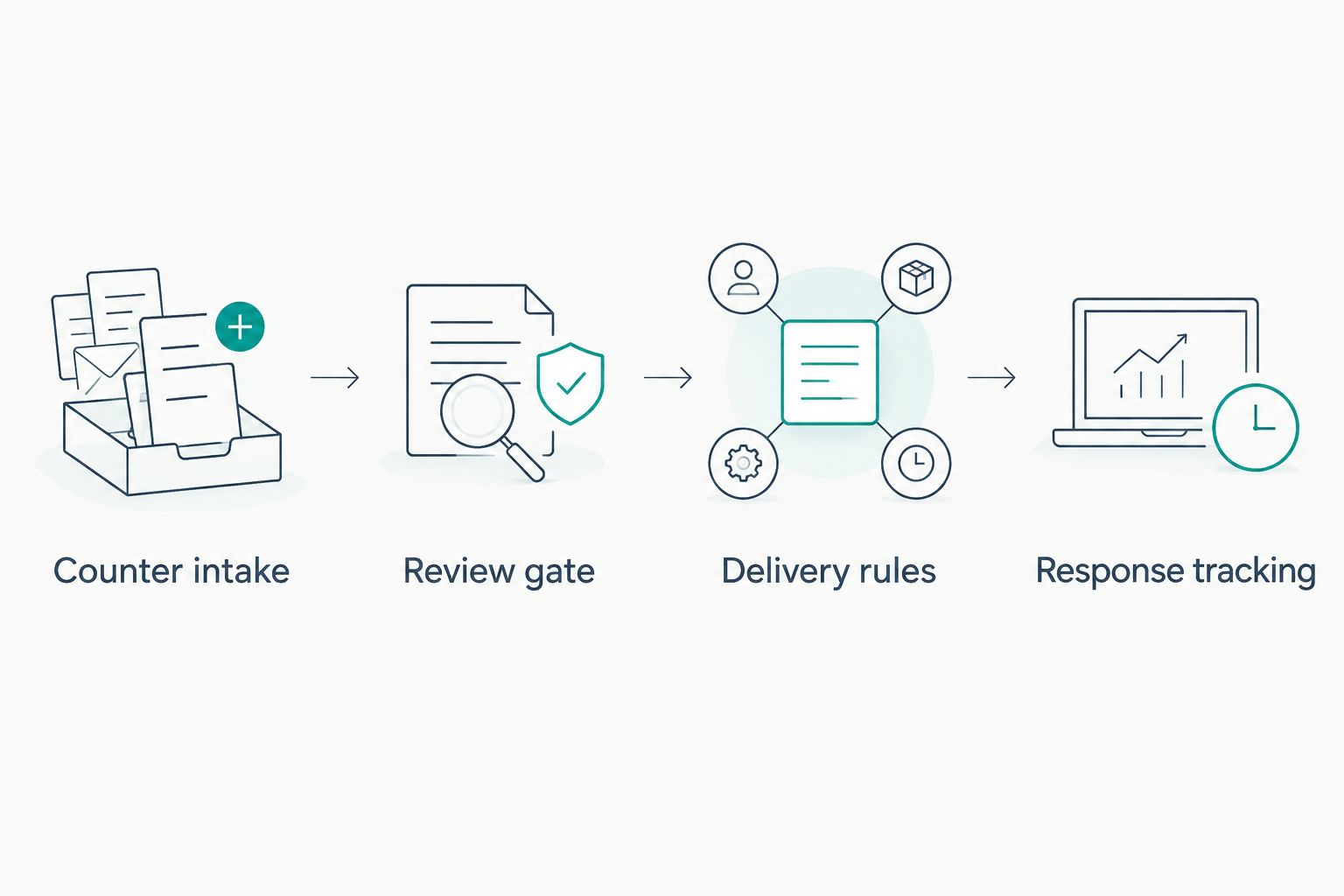
Counter intake
Create a review queue that starts when someone records a lender response. The queue should identify the source before anyone writes a buyer-facing summary.
- Create a transaction record with Transaction ID, Property Address, Buyer Agent Email, and File Owner. Verify the email against current transaction records rather than copying the most recent sender.
- Add Source Response, Received At, Counter Version, and Review Status. Store the original response in the authorized file and reference it from the record.
- Set Review Status to Pending Review when a new counter is logged. Create an internal task for the file owner; do not send anything externally yet.
- Add Lender Deadline and Deadline Time Zone. Copy only what the lender actually states. Leave an unstated deadline blank and create a clarification task.
- Record whether the message changes terms, requests documents, or supplies general status information. Route a document request to its own task rather than calling every lender response a counter.
Expected result: The file contains an identifiable source, a current version, an owner, and an internal review task. No buyer-facing message has left the system.
For a 2026 setup, test intake with sample records that contain no real homeowner information. Confirm that an ordinary status update cannot accidentally enter the counter-notification path.
Review gate
The review gate is the workflow's main control. It connects the lender's actual response to the summary the buyer's agent receives.
- Create Approved Summary, Next Action, Recipient Verified, Attachment Checked, and Approved Version fields. Keep private financial information out of the summary.
- Compare the proposed summary with the original response. Describe the lender's position without presenting it as seller acceptance, buyer acceptance, or final short-sale approval.
- Verify any stated deadline, including its time zone. If the source is unclear, request clarification instead of calculating a deadline from assumptions.
- Check any attachment for unrelated pages, account information, financial statements, and homeowner hardship details. Use an approved redacted copy or a permitted summary when appropriate.
- Set Review Status to Approved to Notify only after the recipient and content checks pass. Record the reviewer and approval time, and match Approved Version to Counter Version.
Expected result: The approved notice matches the current lender response and has a verified recipient. A new counter version requires fresh review rather than inheriting the previous approval.
Check 3 items before release: the recipient, the current counter version, and the lender's stated deadline. Make these release conditions, not a reminder buried in a task description.
Lender terms and state law vary. Route legal questions to qualified legal counsel and tax questions to a qualified tax professional. A notification workflow does not decide contractual obligations or the treatment of an unpaid balance.
Delivery rules
Connect the approved record to your brokerage-approved messaging function. Keep the trigger narrow enough that editing a phone number or adding a note cannot resend the counter.
- Require Review Status to equal Approved to Notify, Recipient Verified to be complete, and Approved Version to match Counter Version. Also require Notification Status to show that this version has not been sent.
- Build the message from approved fields only. Use a subject such as: Lender counter received — property reference — response requested. Avoid sensitive financial details in the subject line.
- Address the notice to Buyer Agent Email. Add only recipients authorized for that communication; never assume everyone copied on an old thread belongs on the new message.
- Send the approved summary and permitted document reference. Then write the send time, recipient, version, and available delivery result back to the transaction record.
- Set Notification Status to Sent only after the messaging system reports a successful send. Route an error to the file owner instead of marking the task complete.
Expected result: One approved counter version produces one logged notice. Editing unrelated fields does not generate another message.
The sequence below summarizes the release path. Review comes before delivery, and acknowledgment remains a separate event afterward.
Suggested message structure
Use this structure for your 2026 template. Populate it only with verified transaction details; omit a deadline line when the lender has not stated one.
- Context: Identify the property and say that a lender counter was received.
- Changed terms: State the reviewed changes without adding interpretations or promises.
- Requested action: Ask the buyer's agent to review the counter with the buyer and provide the required response through the agreed process.
- Deadline: Repeat the lender's stated deadline and time zone accurately.
- Acknowledgment: Ask the agent to confirm receipt, while making clear that receipt is not acceptance.
- Boundary: Explain that the notice communicates the lender's position and does not itself establish agreement among the parties.
Do not write that the short sale is approved unless the actual written lender response supports that statement. A counter and an approval are different file events.
Response tracking
A sent message is not a completed negotiation step. Build follow-up around the response the file needs, not around whether someone opened an email.
- Create Acknowledgment Status, Buyer Response Status, and Follow-up Owner. Keep acknowledgment separate from acceptance or a signed response.
- Create a follow-up task when the notice sends. Assign its timing from the actual lender deadline and your brokerage's review procedures; do not impose a generic lender response window.
- Pause reminders when the buyer's agent acknowledges receipt. Keep the substantive response task open until the required response is recorded.
- Escalate an unacknowledged notice to the file owner for direct contact. Record the contact attempt and outcome in the transaction file.
- Close the notification task only after the response is documented or the owner records another valid disposition, such as withdrawal or replacement by a newer counter.
Expected result: You can distinguish a delivery problem from a pending buyer decision. The file owner can see what needs attention without searching an email thread.
Run 2 test cases before activation: an approved counter that should send and an unapproved counter that must remain internal. Also verify that rerunning the approved record does not duplicate delivery.
Notify the buyer's agent when a counter changes
A revised lender counter needs a new review cycle. Do not edit the old summary and assume a prior notice still represents the lender's current position.
Increment Counter Version, return Review Status to Pending Review, and clear the prior approval for sending purposes. Preserve the earlier source and send history. Label the new notice as a revised counter and identify which earlier version it replaces.
Best for revised terms: version-based notification. The advantage is a clear record of each communicated position. The trade-off is another review task, even when the change looks small.
For broader file updates beyond counters, use the CRM follow-up to short-sale milestone updates workflow. Keep routine progress messages separate from requests that require a buyer decision.
Troubleshooting
- The same counter sends twice. Check whether any record edit can retrigger delivery. Require an unsent current version, and check the send log before retrying a failed workflow.
- The notice goes to the former buyer's agent. Correct the transaction contact and stop pending sends. Require recipient verification again after a buyer or representation change.
- The summary carries an unsupported deadline. Compare it with the source response. Remove calculated dates that were never stated, obtain clarification, and send a correction when necessary.
- Private homeowner material reaches the attachment queue. Stop delivery and replace the attachment with an authorized version. Restrict the workflow to an approved document reference rather than automatically attaching everything in the lender thread.
- The agent acknowledges receipt but reminders continue. Map acknowledgment to the acknowledgment field, not a generic note. Stop receipt reminders while leaving the buyer-response task open.
For your 2026 maintenance review, check failed sends, changed recipients, and notices waiting for acknowledgment. Assign exceptions to a person rather than leaving them in an unattended queue.
Customize your workflow
Extend the same controls to document requests and closing coordination, but give each event its own message and completion condition. A document request ends with the requested material being handled; a counter notice ends with the required response being recorded.
Shortsalesdoneright short sale processing includes preparing the full package for agents, lender negotiation, a dedicated point of contact, and weekly lender updates. That support does not replace your brokerage's communication rules or guarantee lender approval.
If you want to outsource processing, request help through the agent intake form. Explain how your team currently receives lender responses and who approves buyer-facing communications.
Request short sale processing help
Ask about package preparation, lender negotiation, a dedicated contact, and weekly lender updates.
FAQ
What's the best trigger for a buyer's agent short sale counter notification?
Use approval of the current lender-counter version as the external-send trigger. An incoming lender email should create an internal review task, not automatically notify the buyer's agent.
Can I automatically forward the lender's entire counter email?
Use a reviewed summary or an authorized document instead of unreviewed forwarding. The original thread can contain private homeowner information, outdated terms, or unrelated attachments.
Does a lender counter mean the short sale is approved?
A lender counter is not, by itself, final short-sale approval. Describe only what the written lender response supports and keep the parties' required responses separate.
How quickly does the buyer have to respond to a lender counter?
Use the deadline stated in the lender's actual response. If no deadline or time zone is clear, request clarification rather than inventing a response window.
Should opening the notification count as accepting the counter?
No. A message opening or acknowledgment does not establish acceptance. Record the required substantive response separately through the transaction's agreed process.
Can Shortsalesdoneright help agents manage short-sale processing?
Shortsalesdoneright provides package preparation and lender negotiation, with a dedicated point of contact and weekly lender updates. Request help through the appropriate agent intake form to discuss your file.
Does sending a counter notification stop foreclosure or settle the unpaid balance?
Do not treat a counter notification as stopping foreclosure or resolving an unpaid balance. Lender terms and state law vary; ask qualified legal and tax professionals about those issues.
One last thing
The easiest mistake to miss is sending the right message about the wrong version. Tie approval, delivery, and acknowledgment to the same counter version. Before enabling your 2026 workflow, revise a sample counter after approval and confirm that the old approval cannot release it.