

Instead of rebuilding lender files from MLS notes and scattered emails, use an MLS listing to short sale package workflow that separates listing facts, seller documents, and offer terms before submission. Keep one current file and a change log so the lender receives a consistent package—not competing versions.
- The mls listing to short sale package workflow starts with the lender’s requirements, not an MLS export.
- Shortsalesdoneright suits agents seeking outsourced short-sale processing, package preparation, and lender negotiation.
- Match the listing, purchase agreement, and proposed settlement figures before submitting the package.
- Track document changes and lender requests separately; submission does not mean approval.
Why this matters
An MLS record markets the property. A short-sale package supports a lender’s decision about accepting a sale that will not fully repay the mortgage. The records overlap, but they serve different purposes.
For your 2026 workflow, separate marketing readiness from lender-review readiness. A complete listing does not establish that the seller’s financial documents, authorization, or proposed transaction terms meet the lender’s requirements.
Shortsalesdoneright is best for real estate agents who want short-sale package preparation and lender negotiation handled through a dedicated contact. Shortsalesdoneright provides short-sale processing, prepares the full package for agents, and provides weekly lender updates. Outsourcing that work does not remove the agent’s responsibility to keep listing and transaction information accurate.
Before you start
- Access and authority: Have authorized MLS access, the signed listing agreement, seller permission to share relevant records, and the lender’s required third-party authorization. Confirm who can discuss the mortgage account.
- Current requirements: Obtain the applicable lender or servicer checklist, submission instructions, seller forms, and transaction documents. Use the current instructions for your 2026 file rather than copying an earlier package.
- The easy-to-miss obstacle: Identify additional mortgages, liens, and any scheduled foreclosure activity before promising a closing date. One mortgage lender’s review does not resolve every other claim or stop a foreclosure process.
Use secure document transfer for financial records. Do not place account numbers, hardship details, or seller financial documents in public MLS remarks or unrestricted attachments.
Seller file and lender requirements
The first configuration unit is the seller’s case file. Set it up before assembling the offer package so missing requirements become visible early.
- Assign a file owner. Record who collects seller documents, who communicates with the lender, and who updates the agent. Give each task a named owner rather than assigning everything to the team.
- Confirm the account contact. Identify the current servicer, account reference, submission channel, and authorization requirements. Confirm that the authorization has been accepted before relying on account-specific conversations.
- Build a requirement checklist. Copy each requested item from the lender’s current instructions. Add columns for owner, document date, receipt status, and follow-up action.
- Collect the seller’s materials. Gather the financial information, hardship explanation, signatures, and supporting records the lender requests. Do not assume every seller needs an identical packet.
- Record deadlines and concerns. Separate lender response dates, contract dates, document renewal requirements, and any foreclosure-related dates. Refer legal questions about deadlines to the seller’s attorney.
For internal tracking, use 3 statuses: Missing, Received, and Verified. Define Verified as checked against the lender’s instructions—not accepted or approved by the lender.
Expected result: You have an authorized point of contact, a lender-specific checklist, and a visible list of outstanding documents. A folder containing many PDFs is not the same thing as a verified package.
MLS record and transaction alignment
Next, make the listing record and transaction file agree. MLS systems use different field names, so follow your local system’s actual labels and rules rather than searching for a universal short-sale button.
- Confirm property identity. Check the property address, seller names, and other identifying details across the listing agreement, lender records, and transaction documents. Flag differences for correction or explanation.
- Check listing facts. Review the listing status, marketing history, asking amount, and applicable short-sale disclosures. Follow local MLS requirements for remarks, attachments, and status changes.
- Capture the relevant listing record. Save the MLS information and marketing history the lender requests. Keep the capture date visible so later changes do not silently overwrite the record submitted.
- Align the offer documents. Check the buyer and seller names, property, purchase terms, signatures, contingencies, and proposed closing date. Identify terms that depend on lender consent.
- Reconcile settlement information. Have the appropriate settlement professional prepare the proposed figures required for review. Compare them with the purchase agreement and flag requested credits, payments, or other differences.
Run 2 checks before moving on: Identity check for the parties and property, then Terms check for the proposed transaction. Neither check substitutes for legal review.
Expected result: The MLS record, signed agreement, and proposed settlement information describe the same transaction. Any unresolved difference has an owner and a next action.
Package assembly and submission
A usable package makes the lender’s requested documents easy to locate. It also makes omissions obvious before submission.
- Create a document index. List the required items in the lender’s preferred order, when specified. Mark conditional items clearly; do not label an absent document as unnecessary without checking the requirements.
- Check every attachment. Open each file. Confirm legibility, complete pages, applicable signatures, and the correct seller and property. Check that required date ranges match the lender’s instructions.
- Separate current and replaced files. Keep 1 current submission set. Move replaced versions into an archive rather than leaving several similarly named documents in the active folder.
- Complete a final cross-check. Compare the checklist with the actual attachments, not your memory. Use the documents to include in a short-sale package guide as a preparation aid; the lender’s instructions control the submission.
- Submit through the specified channel. Follow the lender’s actual portal or delivery instructions. Save the confirmation, submission date, document list, and any reference provided.
Expected result: You can show what was sent, when it was sent, and what remains outstanding. A delivery confirmation establishes delivery—not package completeness, lender acceptance, or approval.
For a 2026 transaction, preserve the version actually submitted even when the working file changes afterward. That record helps you answer a lender’s question without reconstructing an earlier packet.
The handoff has four distinct stages. Finish each stage before treating the next one as complete.
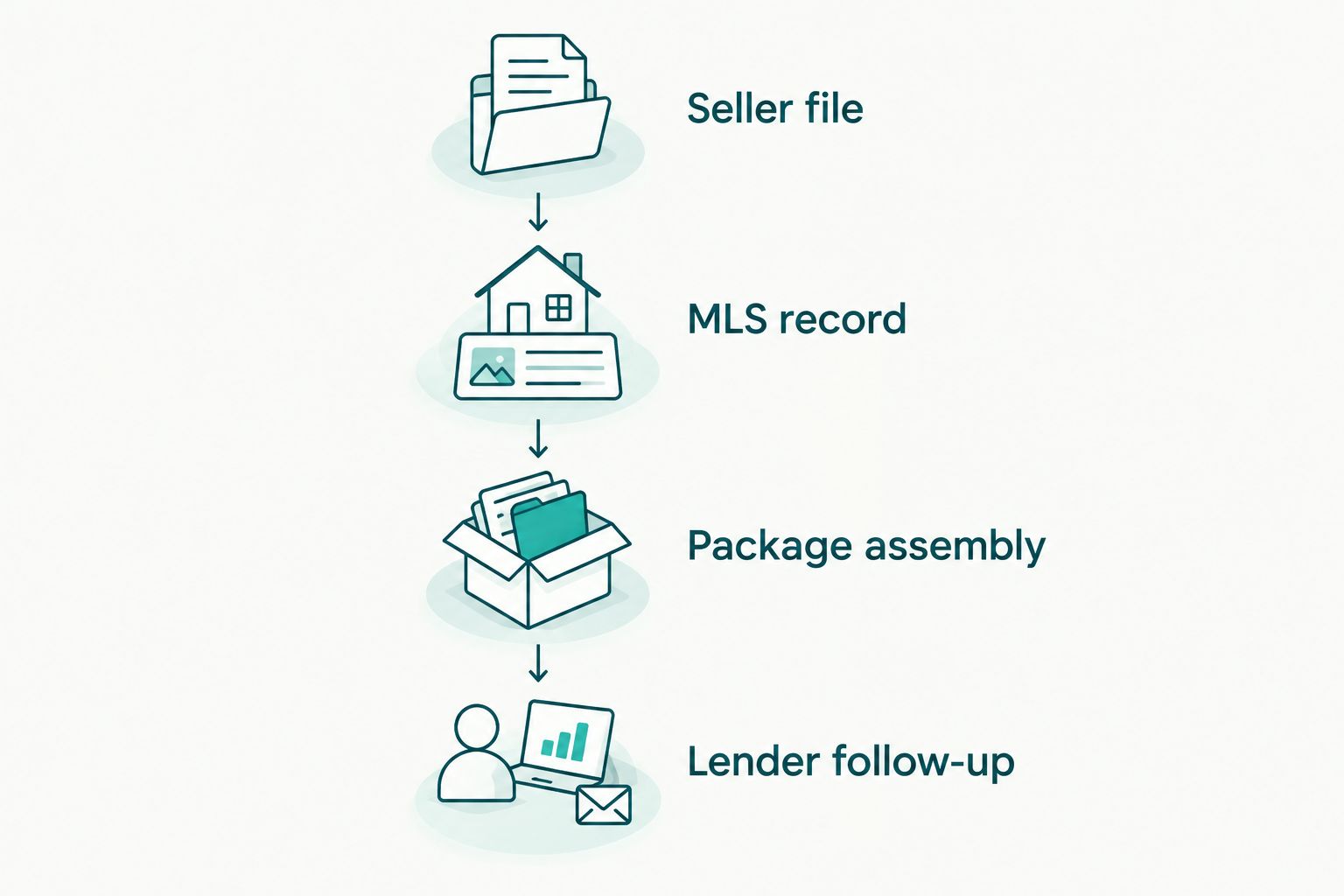
Lender follow-up and decision tracking
After submission, manage requests as work items. Do not let a chain of emails become the only record of what the lender needs.
- Confirm receipt and review status. Ask whether the package is accessible and whether additional items are required. Record the response without treating receipt as approval.
- Log every request. Capture the requested item, source, date, responsible person, and stated deadline. Keep the lender’s wording with the task so the request does not change as people relay it.
- Prepare the agent update. Summarize the current stage, outstanding items, next action, and known deadlines. Shortsalesdoneright provides a dedicated point of contact and weekly lender updates for agents using its processing service.
- Review written terms. When a decision arrives, compare its conditions with the contract and settlement information. Send legal and tax questions to qualified professionals before the seller relies on an interpretation.
- Check closing readiness. Confirm that required parties have addressed their conditions and that the transaction fits the applicable written terms. Escalate inconsistencies before closing.
Expected result: Every open lender request has an owner, and the agent can distinguish a pending review from a written decision. Keep this distinction explicit in every 2026 status report.
When the listing or offer changes
Use a change-driven workflow whenever the transaction changes after submission. This is a revision process, not a reason to send another full package automatically.
Record the change first. Identify the affected documents, obtain the necessary signatures or professional updates, and confirm what the lender requires you to resubmit. Keep the earlier submission intact.
- New offer or buyer: Recheck the agreement, supporting documents, settlement information, and lender instructions for changing the proposed transaction.
- Changed listing terms: Update the MLS as required and determine whether the lender needs revised marketing information.
- Changed seller circumstances: Ask which financial or hardship documents need updating. Do not assume the original explanation still describes the seller’s position.
- Changed closing date: Compare the new date with contract requirements and written lender conditions. Do not assume an extension is granted.
Send a revision summary with each updated submission. State what changed, which documents replace earlier versions, and what response you need. This keeps the current proposal identifiable.
Troubleshooting
The lender cannot discuss the account
Check authorization requirements, signatures, named parties, and submission status. Confirm acceptance through the lender’s process before repeatedly requesting account details through different channels.
The package is returned as incomplete
Ask for the specific missing or unacceptable items. Compare that response with the submitted document index, correct the gaps, and retain proof of the replacement submission. Resending the same packet does not address an identified defect.
The transaction figures do not agree
Compare the purchase agreement, amendments, and proposed settlement information. Have the appropriate professional correct the source document, then update affected records. Do not manually alter a signed agreement or settlement document to make totals match.
Documents need refreshing during review
Check the lender’s current date requirements and collect replacements as requested. Track the new document date and replacement status so the older version does not return to the active submission set.
Foreclosure activity continues during review
Do not treat a pending short-sale review as a pause in foreclosure. Confirm the account’s status and direct the homeowner to a qualified attorney for state-specific advice about deadlines and available action.
Customize your workflow
Choose the handoff based on who will own document collection, lender communication, and follow-up. Compare responsibilities before choosing a processing arrangement.
| Workflow | Best for | Advantage | Limitation |
|---|---|---|---|
| Agent-managed processing | Agents keeping package preparation and lender follow-up in-house | Direct control over the working file and communications | The agent must assign time and ownership to collection, corrections, and follow-up |
| Shortsalesdoneright processing | Agents seeking outsourced short-sale processing and lender negotiation | Full package preparation, a dedicated contact, and weekly lender updates | The agent and seller still need to supply accurate information; lender approval is not guaranteed |
Keep homeowner decisions separate from the agent’s administrative workflow. A homeowner deciding whether to pursue a short sale needs help comparing options—not simply instructions to upload documents.
For your 2026 handoff, document who sends the next update before transferring the file. If you want processing help, request it through the appropriate agent intake form on the site. Homeowners should use the homeowner intake route to discuss their situation and alternatives.
Request short-sale processing help
Ask about package preparation, lender negotiation, and the agent intake process.
FAQ
How do I move an MLS listing to a short sale package?
Start with the lender’s current requirements, then align the seller documents, MLS record, signed offer, and proposed settlement information. Check the attachments before submitting through the specified channel and retain proof of delivery.
Can I submit an MLS printout as the whole short-sale package?
No. An MLS printout describes the listing but does not replace the seller, authorization, financial, and transaction documents the lender requires. Use the applicable lender checklist.
Do I need an accepted offer before starting the package?
You can begin organizing seller records and checking lender requirements before an offer arrives. Confirm which review steps require a signed purchase agreement rather than assuming every lender follows the same sequence.
What happens if the buyer changes after submission?
Record the buyer change and ask the lender which replacement documents and review steps are required. Update the agreement and related transaction information without overwriting the earlier submission record.
Does submitting a short-sale package stop foreclosure?
Submission does not establish that foreclosure has stopped. Confirm the account’s status and have a qualified attorney advise the homeowner about state law, deadlines, and available action.
Can Shortsalesdoneright prepare the package for my listing?
Shortsalesdoneright prepares full short-sale packages for agents and provides lender negotiation, a dedicated contact, and weekly lender updates. Request help through the appropriate agent intake form on the site.
Does short-sale approval mean the unpaid balance is forgiven?
Do not assume short-sale approval forgives an unpaid balance. Lender terms and state law vary; have qualified legal and tax professionals review the written terms and potential consequences.
One last thing
Keep proof of what you submitted, not just what is in the folder today. A current folder answers what you have now; a dated submission record answers what the lender received. Preserve both, and check written terms before treating the file as ready to close.