

Instead of manually chasing every short-sale file, set up CRM short sale milestone updates that turn verified status changes into assigned follow-up tasks. This 2026 workflow separates lender facts from internal reminders so your team knows what happened, who acts next, and what the homeowner can be told.
- CRM short sale milestone updates should trigger from verified file changes, not assumptions about lender progress.
- Shortsalesdoneright short sale processing is best for agents who want package preparation and lender negotiation handled.
- Assign one owner per file and keep internal reminders separate from homeowner messages.
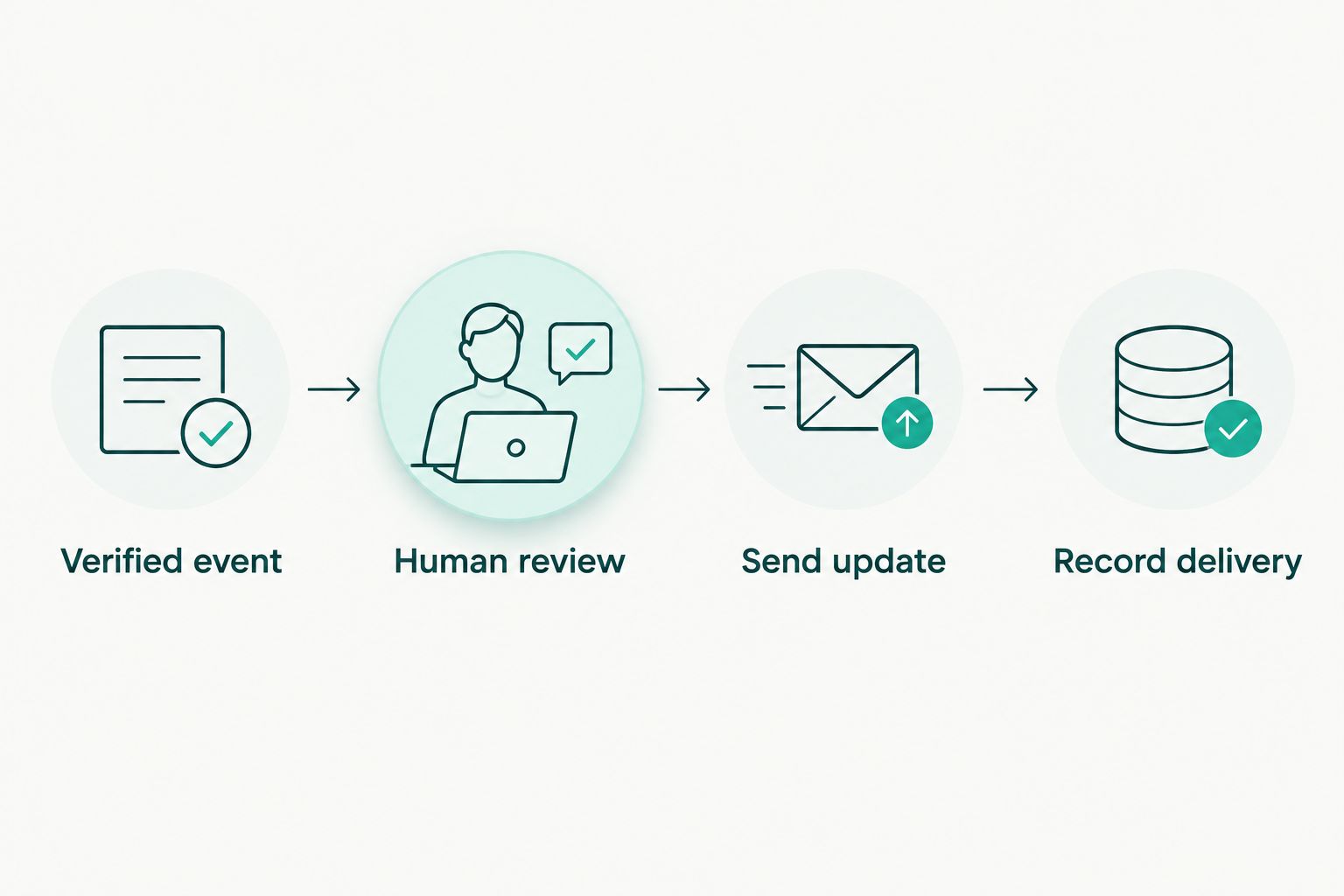
- Require human review before communicating approval, unpaid-balance terms, or closing requirements.
Why this matters
A CRM reminder tells you to act. A milestone records something that actually happened. Confusing the two creates messages that sound like lender progress when your team has only scheduled another call.
Build your 2026 workflow around evidence, not elapsed time. A follow-up deadline can create a task. It cannot establish that a lender received documents, accepted an offer, or approved a sale.
Shortsalesdoneright provides short sale processing and lender negotiation services. Shortsalesdoneright short sale processing is best for agents who want package preparation and lender negotiation handled. The CRM remains your coordination record; it is not a substitute for lender correspondence or professional advice.
Before you start: your 2026 setup
- Access and ownership: Have permission to edit CRM records, configure tasks, and manage any workflow rules you intend to use. Choose one responsible owner per file and identify who can verify lender communications.
- Source material: Gather the current file status, relevant correspondence, contact permissions, and your team's document-storage rules. Keep sensitive financial documents in your approved storage system rather than copying them into outgoing notifications.
- The hidden gotcha: Confirm how your CRM handles repeated edits and existing records before enabling automation. A rule that runs whenever a record changes can resend an old update unless you add a duplicate-prevention condition.
This guide uses proposed custom field names, shown in bold. Create equivalent fields in your CRM; these are not claims about built-in menus or a native connection to a processing service. Where your CRM lacks conditional automation, use the same structure with manually assigned tasks.
File record configuration
Create a status record that can be checked
- Add File Owner, Property Reference, and Primary Contact. Use your existing unique record identifier to distinguish files with similar names.
- Create Verified Milestone as a controlled-choice field. Start with factual labels such as Package prepared, Package submitted, Receipt confirmed, Additional information requested, Written decision received, and Closed.
- Add Source Reference, Verified By, and Verified On. Record where the supporting communication lives, who checked it, and when.
- Add Next Action, Action Owner, and Action Due. Keep these separate from the milestone so scheduling work does not change the reported lender status.
- Add Last Communicated Milestone and Last Update Sent. These fields help your team check whether a particular development has already been communicated.
Expected result: You can open a file and distinguish the last verified event from the next internal task without reading a long activity history.
Do not force every file through a fixed sequence. A lender can request more information after an earlier submission. Preserve that event in the activity history rather than erasing what happened before it.
Set the ownership rule
Keep one accountable owner per file, even when several people contribute. The owner coordinates the next action; the person verifying a lender communication can be someone else.
Give the file a backup contact through your normal team process. Ownership should not disappear when the assigned agent is away. Restrict permission to change verified milestones to people responsible for checking the underlying evidence.
Milestone trigger configuration
Separate evidence from notification
- Define the trigger as a change to Verified Milestone, not any edit to the record. If your CRM cannot detect a field change, require the owner to initiate the review task manually.
- Require Source Reference, Verified By, and Verified On before a milestone becomes eligible for communication. An unsupported status should remain an internal draft.
- Compare Verified Milestone with Last Communicated Milestone. When they match, do not create another routine notification for that same event.
- Route Additional information requested and Written decision received to a human review task. Do not send a lender document directly to a homeowner through an unchecked template.
- Assign the review task to File Owner and include Next Action, Action Owner, and Action Due.
Expected result: A verified change creates a reviewable task, while an unrelated note edit leaves the communication queue alone.
For your 2026 test, use 2 test records with fictional, non-sensitive information: one with a new milestone and one with a milestone already communicated. Confirm that only the new event creates the intended task. Then edit an unrelated note and check that neither record sends another update.
For a fuller explanation of the events your fields describe, use the short sale timeline and milestones guide. Keep milestone definitions consistent across your team before adding more automation.
Message review and delivery configuration
Build messages around the next action
- Draft a review template with four plain-language parts: verified event, practical meaning, next action, and responsible person. Include a deadline only when it comes from the file or your documented internal schedule.
- Create Review Status with the choices Draft, Ready for review, and Approved to send. These are internal workflow labels, not lender decisions.
- Require the reviewer to confirm the recipient and permitted communication channel. Check whether the message is for the agent, homeowner, or another authorized participant.
- Send only after the reviewer confirms the wording matches the source. Record the communication in the file and update Last Communicated Milestone and Last Update Sent after successful delivery.
Expected result: Every delivered message describes a verified event and gives the recipient a clear next step without overstating the outcome.
Use different content for different audiences. An agent needs the processing status, outstanding work, and responsible party. A homeowner needs a plain explanation of what changed and whether anything is required from them.
For example, a receipt-confirmation message can explain that the lender confirmed receipt and that the file remains under review. It must not describe receipt as acceptance or approval. A written decision also needs review: record its conditions, not just its headline.
Review schedule and exception configuration
Catch quiet files without inventing progress
- Create Next Review Date separately from Action Due. The former checks the file; the latter assigns a specific piece of work.
- Use a 7-day internal review interval as a starting template for routine files. Adjust it to documented lender requests, transaction deadlines, and your team's responsibilities; it is not a lender response estimate.
- When the review date arrives, create an internal task to check correspondence and outstanding actions. Do not advance Verified Milestone automatically.
- Establish an exception route for approaching deadlines, delivery failures, and unresolved requests. Assign a person to review each exception instead of sending another generic reminder.
Expected result: A quiet file receives attention without generating a false progress update.
Shortsalesdoneright provides a dedicated point of contact and weekly lender updates. Record those updates in your coordination process, keeping the update date separate from the date of the underlying lender event. A weekly update does not mean the lender has reached a new milestone.
Second workflow: follow up when information is requested
A document request needs its own follow-up loop. The milestone records the lender's request; the task tracks your team's response.
- Record the request under Verified Milestone and reference the source. List the requested items in the approved file-management location.
- Assign Action Owner to the person responsible for collecting or preparing the response. Record an actual lender deadline when one is provided; label your internal deadline separately.
- When the response is submitted, record that submission as an event. Do not mark the request resolved merely because someone uploaded a document internally.
- Confirm the next required step from the available correspondence. If receipt or acceptance remains unconfirmed, keep that distinction visible.
Expected result: Your team can see the difference between requested, prepared, submitted, and confirmed without treating them as interchangeable.
Choose the right workflow for the event
| Workflow | Best for | Benefit | Limitation |
|---|---|---|---|
| Verified milestone update | Communicating a documented file event | Gives recipients a factual status and next action | Requires evidence and message review |
| Scheduled follow-up task | Checking a file when no new event is confirmed | Keeps ownership and review dates visible | Does not establish lender progress |
Use both workflows, but never let a scheduled task manufacture a milestone. The event workflow explains what happened. The reminder workflow makes sure someone checks what happens next.
Troubleshooting
The same update keeps appearing
Check whether your rule runs on every record edit. Limit it to the relevant field change and compare the current event with the communication history. Repeated requests with the same milestone label still need separate event records so a genuinely new request is not suppressed.
A prepared package looks like a submitted package
Split the statuses. Package prepared means your team has assembled the materials; Package submitted means the submission occurred. Require supporting information before changing the second status, and do not treat either as confirmed lender receipt.
A homeowner receives agent-only details
Review the recipient mapping and template selection. Keep internal negotiation notes out of homeowner messages unless the responsible reviewer approves their inclusion. Pause the affected workflow until the mapping is corrected and tested.
A decision message sounds like unconditional approval
Stop the message and review the written terms. Record conditions and route questions about legal effect or tax treatment to qualified professionals. Lender terms and state law vary; a CRM label cannot establish forgiveness of an unpaid balance.
Reminders fire after a file is closed
Add an exclusion for Closed records to routine follow-up rules. Review already-created tasks separately, since changing a rule does not prove that existing tasks were canceled. Preserve the file's history according to your organization's retention requirements.
Customize your workflow
If you revise this workflow during 2026, change one rule at a time and repeat the test before applying it to active files. Start with internal tasks. Add external messages only after recipient selection, review, and delivery logging work as intended.
Shortsalesdoneright prepares the full short-sale package for agents and handles lender negotiation. That service addresses processing work; your CRM still needs clear ownership, accurate records, and appropriate communication controls. Outsourcing processing does not guarantee lender approval or remove the need to review terms.
Agents ready to outsource processing can request help through the appropriate agent intake form on the site. Keep sensitive file materials out of a general inquiry unless the intake instructions specifically request them.
Request short-sale processing help
Ask about package preparation, lender negotiation, and coordination for your agent workflow.
FAQ
How do I set up CRM short sale milestone updates?
Create separate fields for verified milestones, supporting sources, task ownership, and communication history. Trigger a review task when a documented event changes, then record delivery after the approved message is sent.
Can my CRM automatically update the lender's short-sale status?
A CRM rule alone cannot verify the lender's status. Use checked correspondence or another authorized source before changing the verified milestone; this guide does not assume a native lender connection.
What's the difference between a short-sale milestone and a reminder?
A milestone records a verified event, while a reminder asks someone to act or check the file. A scheduled reminder must not advance the lender status automatically.
How often should an agent check a short-sale file?
Set the review schedule around documented requests and transaction deadlines. The guide's 7-day internal review interval is a starting template, not a promised lender turnaround time.
Should homeowners receive every internal CRM update?
No. Send homeowners relevant, reviewed explanations of verified developments and required actions, rather than every internal note or task change.
Does a written short-sale decision mean the unpaid balance is forgiven?
Do not infer forgiveness from the CRM status or the existence of a written decision. Lender terms and state law vary; have qualified legal and tax professionals address the applicable terms and consequences.
Can outsourced short-sale processing replace my CRM workflow?
Processing services and CRM coordination serve different purposes. A processor can handle assigned processing work, while your team still needs clear ownership, accurate records, and controlled communications.
One last thing
A recent update date is not proof of recent lender progress. Keep the date your team communicated separate from the date the lender event occurred. That small distinction prevents a freshly edited file from looking further along than it is.