

Instead of manually chasing uploads and lender messages, organize your lender portal short sale submission around a verified package, a submission receipt, and a response log. This 2026 workflow takes agents from authorized access through the lender’s written decision and, if approved, the closing handoff.
- A lender portal short sale submission needs verified documents, submission evidence, and tracked lender requests—not just an upload.
- Shortsalesdoneright is best for agents seeking outsourced short sale processing and lender negotiation.
- Keep the portal receipt, lender requests, and current document versions together in the short sale package record.
- Written approval controls the closing handoff; uploading documents does not establish approval.
Why this matters
A successful upload is not a complete review, and a complete review is not approval. Treat those as separate checkpoints. Otherwise, your seller and buyer can mistake a portal confirmation for progress the lender has not confirmed.
Shortsalesdoneright provides short sale processing and lender negotiation services, including package preparation, a dedicated point of contact, and weekly lender updates. Agents can outsource that coordination while staying responsible for their listing and transaction obligations.
For your 2026 file, separate three questions: What was delivered? What does the lender still need? What has the lender actually decided? Record each answer with its source and date.
Before you start
- Access and authority: Confirm the correct mortgage servicer, its designated submission channel, your access, and the borrower authorization required for communication. Do not assume a listing agreement grants access to mortgage information.
- Package and ownership: Gather the lender’s current checklist, seller materials, transaction documents, and any information about additional liens. Assign 1 file owner to track submissions and requests, even when several people supply documents.
- The gotcha: Starting or saving an upload does not necessarily submit the package for review. Identify how the lender confirms receipt and what action, if any, completes submission before you begin.
Portal layouts and required documents differ. Follow the lender’s actual field names, instructions, and confirmation process; there is no universal set of short sale submission buttons.
Package preparation
Build the review-ready record
- Obtain the lender’s current short sale instructions. Confirm whether it accepts the file through a portal, another designated channel, or a processor acting with the necessary authorization.
- Build a document checklist from those instructions. Separate seller financial information, hardship materials, authorization documents, and transaction documents so missing items remain visible.
- Check identifying information across the package. Names, property address, and the relevant loan reference should agree with the lender’s record. Resolve discrepancies before uploading.
- Review signatures, dates, legibility, and completeness. Include all pages the lender requires, including pages that contain no transaction figures when the instructions call for complete statements.
- Record which documents depend on the current offer or financial circumstances. Those items need attention when facts change during review.
Use the short sale package document guide as a preparation aid, not a substitute for the lender’s checklist. A generic package cannot establish what a particular lender requires.
Expected result: You have a checklist showing each required item, its current version, and any unresolved gap. Do not mark a file complete merely because a folder contains documents.
Choose who handles the processing
Decide ownership before submission. Both arrangements need clear authority, seller cooperation, and someone accountable for follow-up.
| Processing arrangement | Best for | Practical benefit | Limitation |
|---|---|---|---|
| Agent-managed processing | Agents keeping document coordination and lender follow-up in-house | Keeps processing tasks within the agent’s own workflow | The agent must manage package checks, requests, and status tracking |
| Shortsalesdoneright short sale processing | Agents seeking outsourced package preparation and lender negotiation | Provides full package preparation, a dedicated contact, and weekly lender updates | Outsourcing does not replace seller cooperation or guarantee lender approval |
Choose based on who will own the work, not who can upload a file. If you retain processing, reserve time for document corrections and lender requests. If you outsource, agree on who supplies missing information and who communicates with the seller.
Portal submission
Create a traceable delivery record
- Open the correct property or loan record using the lender’s instructions. Check the identifiers before attaching anything, especially when you manage several listings.
- Match documents to the requested categories. Follow the portal’s permitted file formats, size limits, and naming instructions rather than assuming another lender’s requirements apply.
- Review each attachment after upload where the portal allows it. Confirm that the file opens, contains the intended pages, and belongs to the correct borrower.
- Complete the lender’s required submission action. Saving documents or leaving them in a draft record is not evidence that the lender received a review request.
- Preserve the confirmation, reference number if provided, submission date, and list of delivered documents. Store that evidence with the transaction record using appropriate access controls.
Expected result: You can show what you submitted, when you submitted it, and what acknowledgment the lender provided. If acknowledgment is unclear, verify receipt through the lender’s designated contact channel.
Use 2 submission checkpoints: attachment verification before submission and receipt verification afterward. These are workflow controls, not lender processing deadlines.
The 2026 workflow should keep delivery evidence separate from review status. A receipt supports the statement that a package was delivered; only the lender can confirm whether it considers the package complete for review.
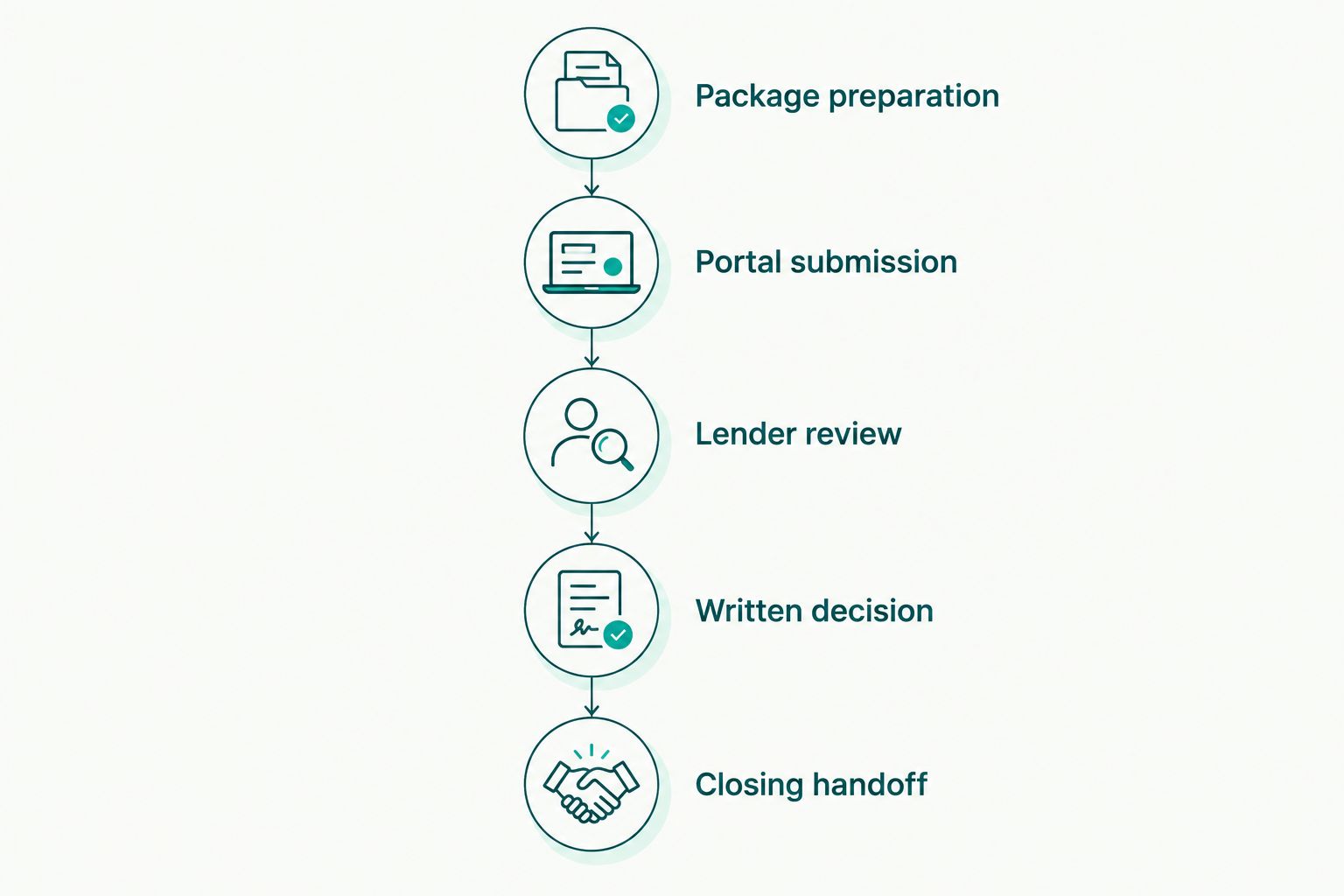
Lender review
Track requests without losing the current version
- Start a response log. Record the lender’s request, the date received, its stated deadline, the responsible person, and the evidence that the response was delivered.
- Confirm what the lender means when a request is unclear. Ask which document, period, signature, or transaction detail needs correction before collecting another package from the seller.
- Route each request to its owner. The seller supplies personal financial information; the agent coordinates transaction documents; qualified professionals address legal and tax questions.
- Submit the requested response through the designated channel. Keep the earlier version in your record while clearly identifying the replacement as current.
- Ask what remains outstanding after responding. Record the answer without changing an unresolved request to complete based solely on your upload.
Expected result: Every open request has an owner and a next action. The record distinguishes documents sent from documents the lender has accepted as responsive.
Set a communication cadence for the seller and buyer’s agent. 1 weekly status update is a useful internal commitment, even when the update is that no new lender decision has arrived. Do not describe that cadence as a promise of weekly lender activity.
Shortsalesdoneright provides weekly lender updates and a dedicated point of contact. Keep your own transaction communications aligned with confirmed information rather than predicting an approval date.
For a 2026 status note, use plain distinctions: submitted, awaiting receipt confirmation, additional information requested, under review if confirmed, or written decision received. Avoid calling the transaction approved before the written decision supports that statement.
Written decision and closing handoff
Check the terms before planning performance
- Obtain the lender’s written decision. If approval is issued, read the complete document rather than relying on a portal status, phone summary, or forwarded excerpt.
- Compare the approved terms with the actual transaction. Check the property, borrower, buyer where specified, settlement terms, required payments, conditions, and stated expiration or closing deadline.
- Identify any additional lienholder decisions or releases needed for closing. Do not treat one lender’s approval as approval from every party with a claim against the property.
- Send the decision to the appropriate closing professional and seller advisers. Direct questions about unpaid balances, releases, tax treatment, and legal consequences to qualified professionals.
- Confirm how closing documents and evidence of completion must be returned. If the transaction cannot meet a condition or deadline, request further written direction before relying on different terms.
Expected result: The closing team has the written terms, knows the unresolved conditions, and can identify what must happen before closing. An approval letter is not permission to disregard its conditions.
Lender terms and state law vary. Do not promise lender approval, forgiveness of an unpaid balance, or a specific credit-score result. The seller needs advice about the actual documents and circumstances, not a general assurance about short sales.
When the offer or seller information changes
Use a change-driven workflow alongside the initial submission process. A revised offer or changed financial information needs its own record; silently replacing a file leaves reviewers and transaction participants working from different facts.
- Identify what changed and which documents it affects. Distinguish a correction from a new offer, revised settlement terms, or changed seller circumstances.
- Ask the lender how to submit the revision and whether it affects the current review. Do not assume the portal automatically alerts the assigned reviewer.
- Provide the updated materials and identify what they replace. Preserve the previous version in your transaction record.
- Confirm receipt and any new instructions. Update the response log and notify the relevant transaction participants.
Expected result: The lender can identify the current proposal, and your file explains why it changed. If approval already exists, obtain written confirmation that the changed transaction remains acceptable before relying on it.
This second workflow is particularly useful when a buyer changes or a closing date moves. It does not establish that the lender will accept the revision or extend an approval.
Troubleshooting
Documents uploaded, but receipt is unclear
Check whether you completed the required submission action. Look for the lender’s acknowledgment, then verify through the designated contact channel if needed. Avoid repeated uploads until you understand whether the original delivery succeeded.
The lender requests something already submitted
Match the request against the exact version delivered. It might concern missing pages, an outdated period, or a document filed under the wrong category. Send the submission reference and ask what specifically remains unresolved.
Authorization does not permit communication
Verify the lender’s authorization requirements and the borrower information on the form. Correct the issue through the required process. Do not use another person’s credentials to bypass an access problem.
A review request has no clear owner
Assign responsibility immediately and record the lender’s stated deadline. Ask for clarification if the task is ambiguous. A request sitting in a shared inbox is not a managed response.
Approval terms do not match the transaction
Stop treating the file as ready for closing. Identify the mismatch and request written clarification or revised terms through the lender’s process. Do not assume a verbal explanation overrides the written decision.
Customize your workflow
Keep your 2026 tracking record simple: current stage, last confirmed lender communication, open request, responsible person, stated deadline, and next action. Restrict access to borrower financial information and follow your organization’s document-handling requirements.
If you want processing support, use the agent intake form on the Shortsalesdoneright website to request help. Keep the request focused on the file’s stage, missing items, and lender communications rather than an assumed approval date.
Request short sale processing help
Use the agent intake form to request package preparation and lender negotiation support.
FAQ
How do I complete a lender portal short sale submission?
Follow the lender’s current instructions, submit the required package, and preserve its acknowledgment. Verify receipt separately from whether the lender considers the package complete for review.
Does uploading a short sale package mean the lender approved it?
No. An upload establishes neither a complete review nor approval. Obtain the lender’s written decision and check all conditions before arranging performance around it.
Can an agent outsource short sale portal processing?
Yes. Agents can request outsourced package preparation and lender negotiation from Shortsalesdoneright. Confirm responsibilities for seller documents, lender requests, and transaction communications before handing off the file.
What should I do if the lender asks for documents I already sent?
Compare the request with the exact documents and versions submitted. Provide the delivery reference and ask whether the issue concerns completeness, currency, signatures, or document placement.
What happens if the buyer changes during short sale review?
Ask the lender how to submit the changed transaction and what review it requires. Provide the revised documents and obtain written confirmation before relying on any existing approval.
Does short sale approval forgive the remaining mortgage balance?
Do not assume approval forgives an unpaid balance. Lender terms and state law vary; have a qualified attorney review the written terms and a qualified tax professional address tax questions.
How long does lender portal review take in 2026?
Use the lender’s current guidance for the individual file rather than a universal timeline. Track outstanding requests, confirmed review status, and any stated deadlines without promising an approval date.
One last thing
The most useful status update names the next action, not just the stage. Replace “still with the bank” with the confirmed request, its owner, and the next follow-up. That gives the seller useful information without making a promise the lender has not made.