

Instead of manually chasing signatures and forwarding mismatched attachments, build a DocuSign short sale approval workflow that collects the right signatures, preserves the signed package, and tracks lender review separately. This 2026 guide takes real estate agents from document preparation to a written lender decision and a checked closing handoff—without treating an electronic signature as bank approval.
- A DocuSign short sale approval workflow collects signatures; only the lender can issue the short sale approval.
- Shortsalesdoneright is best for real estate agents seeking outsourced short sale processing and lender negotiation.
- Confirm electronic-signature acceptance before sending the short sale package, then keep lender review separate from signature status.
- Check written approval terms and deadlines before sending the file to closing; lender terms and state law vary.
Why this matters
A completed DocuSign envelope is not a completed short sale. It records completion of the signing process you configured. It does not establish that a lender accepted the package, approved the offer, or released the homeowner from an unpaid balance.
Shortsalesdoneright provides short sale processing and lender negotiation services. For agents outsourcing that work, the service includes preparing the full short sale package, a dedicated point of contact, and weekly lender updates.
For your 2026 file checklist, keep three statuses distinct: signatures complete, package received, and written approval received. Each status needs its own evidence. Moving one forward does not move the others.
Before you start
- Access and authority: Have a DocuSign account with sending access, verified signer email addresses, and the lender's required authorization to discuss the mortgage. Confirm who signs each document.
- Current materials: Gather the lender's current checklist, required forms, offer documents, and supporting financial records. Follow the lender's instructions for document dates and delivery.
- The gotcha: Confirm that the lender accepts electronic signatures on each relevant document. Electronic signing does not replace a separate notarization, original-document, or lender-specific requirement.
Use the lender's current instructions for your 2026 submission, not an old transaction's checklist. A package that worked on another file is not proof that this lender accepts the same forms or signature method.
Before uploading financial records, confirm the authorized recipients and your brokerage's document-handling requirements. Do not copy buyers or unrelated parties on a seller's financial package.
Signature package
Prepare the documents
- Review the lender's checklist against your file. Mark each required item as ready, missing, or awaiting an update.
- Confirm names, property details, and document versions before requesting signatures. Resolve inconsistencies instead of asking the seller to sign around them.
- Separate documents by who needs to see and sign them. Keep confidential seller records out of envelopes intended for other transaction participants.
- Use 1 envelope for a related signing task when the recipients and document requirements match. Use separate envelopes when access or signing requirements differ.
For the underlying paperwork, use the guide to documents to include in a short sale package. The lender's own checklist remains the submission standard.
Expected result: You have a defined signing packet, verified recipients, and a separate list of supporting records that do not require signatures.
Configure the envelope
These steps use the DocuSign eSignature web sending workflow. Account permissions and enabled features affect which controls you see; use your account's sending interface rather than a lender's unrelated portal.
- Select New, then Send an Envelope. Upload the documents prepared for this signing task.
- Add the intended recipients using verified names and email addresses. Assign signing or copy-only roles according to the task.
- Enable Set Signing Order only when one recipient must finish before another begins. Do not add a sequence unless the transaction requires it.
- Give the envelope a descriptive subject. Identify the signing task without placing sensitive financial details in the email subject.
- Select Next to place the signing fields.
Do not add the lender as a signer just to make the workflow look complete. Include a lender recipient only when the lender directs you to use that signing process.
Expected result: The envelope contains the correct documents, recipients, and signing sequence. No recipient receives access merely because they are involved elsewhere in the transaction.
Signature verification
Place fields and send
- Select the intended recipient before placing that person's fields. Assign each field to the signer who must complete it.
- Place Signature, Date Signed, and any required Initial fields where the document requires them. Do not cover existing text or leave a required signature location unassigned.
- Review every page for missing fields, incorrect assignments, and blank information that should be completed before signing.
- Perform 2 checks before sending: verify the recipient list, then verify the field assignments. Review the email message for a clear description of the requested action.
- Select Send after the document and recipient checks are complete.
In your 2026 procedure, make the sender responsible for this review. A signer should not have to discover that another person's signature field was assigned to them.
Expected result: Each signer receives the intended request and can complete the fields assigned to that signer.
Preserve the completed packet
- Monitor the envelope rather than relying only on email notifications. An opened request is not a completed signature.
- When signing finishes, download the completed documents and the available completion certificate.
- Open the downloaded files. Check that the expected signatures appear and that the packet contains the intended document versions.
- Save the completed packet in the transaction file. Keep unsigned drafts clearly separate from the signed submission copy.
The completion certificate supports the signing record. It does not prove that the lender received the package or accepted the signatures.
Expected result: You have a readable, signed packet and its signing record, ready for the lender's specified submission channel.
Lender submission
Submit and record receipt
- Combine the completed signing documents with the supporting records required by the lender. Check the final package against the current checklist.
- Submit through the channel the lender specifies. Do not assume that emailing a DocuSign completion notice satisfies the lender's submission instructions.
- Record what you submitted, the submission date, and any reference or confirmation provided.
- Ask the lender or assigned contact to confirm receipt and identify missing items. Track that response separately from the DocuSign envelope status.
- Assign responsibility for follow-up. Record outstanding requests and who must supply each item.
Expected result: The file contains submission evidence and a clear record of whether the lender has acknowledged receipt. Signing completion is no longer being used as a substitute for lender status.
The workflow has four separate checkpoints: Signature package, Signature verification, Lender submission, and Approval handoff. Keep those labels in your checklist so a colleague can understand the file without reconstructing the email chain.
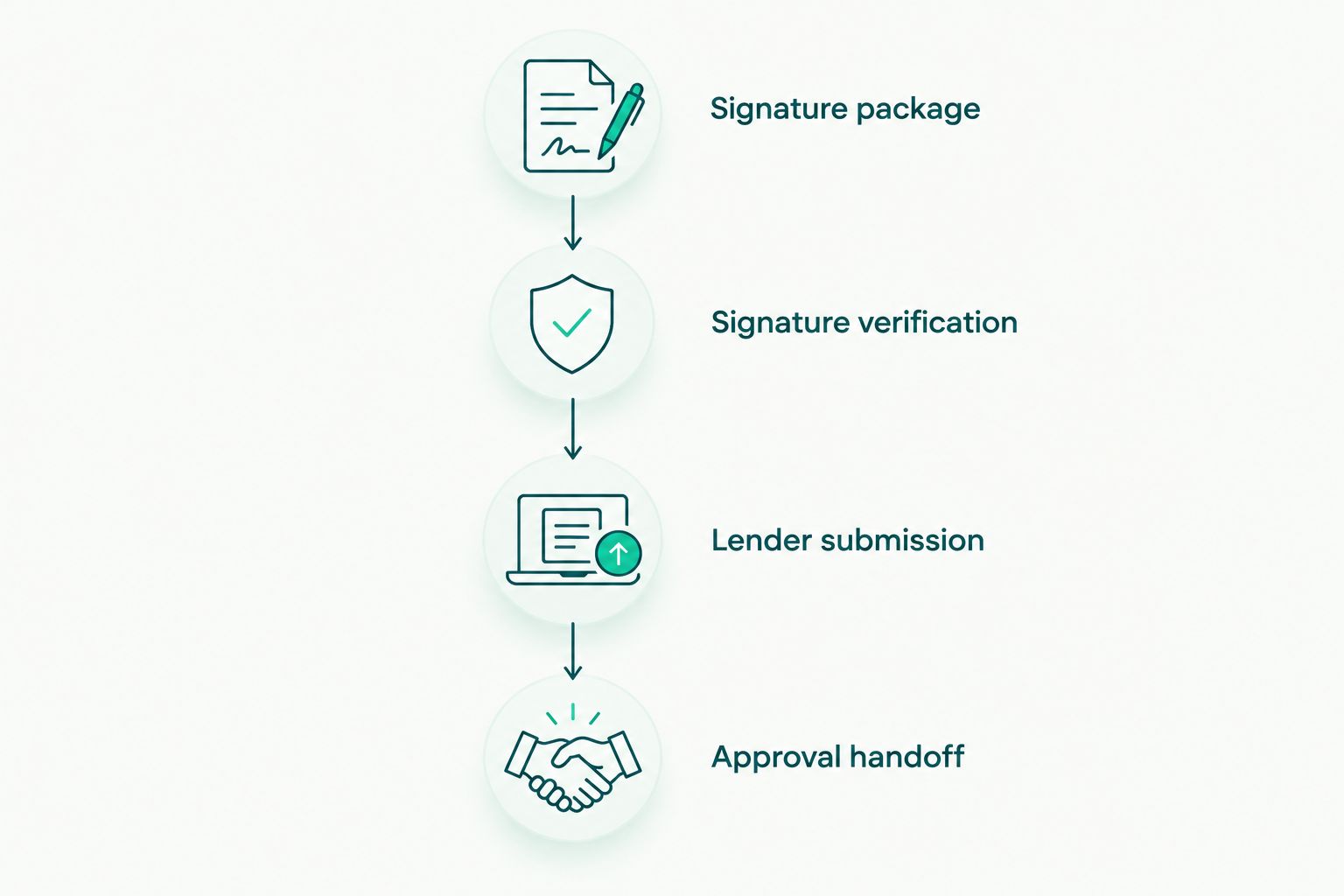
A shared status record should identify the next action, its owner, and the supporting document. Record actual lender responses, not assumptions based on how long the package has been submitted.
Approval handoff
Check the written decision
- Obtain the lender's written decision through its authorized process. Do not describe a verbal update as final written approval.
- Check the property, parties, transaction terms, required proceeds, conditions, and applicable deadlines against the current transaction.
- Confirm which mortgage or lien the decision addresses. Do not assume one lender's letter resolves another lienholder's requirements.
- Have the closing professional review the approval against the proposed closing documents. Refer questions about an unpaid balance or release language to a qualified attorney.
- If the lender requires a signed acknowledgment, confirm the permitted signature method and required signers before creating that envelope.
- Deliver the checked approval and any required acknowledgment to the authorized closing participants. Record unresolved conditions rather than marking the file ready prematurely.
Expected result: The closing team has the written lender decision, relevant signed acknowledgments, and a clear list of conditions still requiring action.
Signed approval paperwork does not guarantee forgiveness of an unpaid balance. Lender terms and state law vary. Homeowners should take legal questions to a qualified attorney and tax questions to a qualified tax professional.
When the lender requests updated documents
An updated-document request is a second workflow, not a reason to resend the entire original envelope automatically. First determine whether the lender needs new signatures, updated supporting records, or both.
| Workflow | Best for | Benefit | Limitation |
|---|---|---|---|
| Initial submission | Building the first complete lender package | Establishes a documented starting point | Requires checking every required item |
| Updated submission | Answering a specific lender request | Keeps the response focused on requested changes | Needs version control and a receipt check |
For an updated submission:
- Save the lender's request and identify exactly which items changed.
- Prepare the revised documents without editing an already completed signed packet.
- Create a new envelope when fresh signatures are required. Do not seek signatures again on unchanged records without a reason.
- Submit the requested updates through the lender's required channel and identify what they replace.
- Preserve the earlier submission and record acknowledgment of the update.
Expected result: The lender receives a traceable update, and your transaction file shows which version is current.
Troubleshooting
The signer cannot find the request
Verify the email address and ask the recipient to check filtered mail. If the address is correct and the envelope remains active, use Resend from the envelope actions. Do not create duplicate envelopes just to generate another email.
The email address or field assignment is wrong
For an in-progress envelope, use Correct when that action is available and appropriate. Review the corrected recipient or field before resending. A completed envelope requires a new signing process for revised documents; preserve the original record.
DocuSign shows completion, but the lender has no package
Submit the downloaded documents through the lender's required channel and obtain receipt confirmation. A completed envelope proves neither lender delivery nor package acceptance. Update the lender-submission status only when you have supporting evidence.
The lender rejects the signature method
Ask which document and requirement caused the rejection. Obtain the permitted signature format and resubmit through the stated process. Repeatedly sending the same electronic packet does not fix a signature-method problem.
Approval terms do not match the transaction
Pause the closing handoff and request clarification through the lender's authorized contact. Do not edit the lender's approval letter. Have the closing professional and, where needed, qualified counsel address the mismatch before relying on the document.
Customize your workflow
For a repeatable 2026 process, add an owner and evidence requirement to each checkpoint. Your agent handles transaction decisions within their role; the processor handles assigned package preparation and lender follow-up. Document the division so neither person assumes the other submitted an update.
Shortsalesdoneright is best for real estate agents seeking outsourced short sale processing and lender negotiation. Preparing the full package, providing a dedicated contact, and delivering weekly lender updates addresses the administrative side of the file. The lender still controls its decision, and the service does not replace legal or tax advice.
Ready to delegate? Request help through the appropriate agent intake form on the website. Homeowners should use the homeowner intake route to discuss a short sale and other options rather than following an agent's document-sending instructions alone.
Request short sale processing help
Ask about package preparation, lender negotiation, a dedicated contact, and weekly lender updates.
FAQ
Does DocuSign approve a short sale?
No. DocuSign collects electronic signatures; the lender decides whether to approve the short sale. Keep the completed signing packet separate from the lender's written decision.
Can I use DocuSign for a lender's short sale approval letter?
Use DocuSign for an approval-letter acknowledgment only when the lender permits that signature method and requires the acknowledgment. Follow the lender's instructions for signers, document format, and delivery.
What does completed mean in a DocuSign short sale approval workflow?
Completed means the envelope's configured signing process has finished. It does not mean the lender received the package, accepted it as complete, or approved the sale.
Should I send the lender a DocuSign completion email?
Submit the signed documents through the lender's required channel rather than treating the completion email as the package. Save the submission evidence and seek receipt confirmation.
What happens if the lender asks for updated financial documents?
Prepare the specific updates the lender requests and obtain new signatures when required. Preserve earlier versions and record which documents the new submission replaces.
Does a signed short sale approval erase the unpaid mortgage balance?
Do not assume that a signed approval erases the unpaid balance. Lender terms and state law vary; have a qualified attorney review the relevant language and consult a qualified tax professional about tax consequences.
Can Shortsalesdoneright handle processing while I manage the listing?
Shortsalesdoneright provides short sale processing and lender negotiation services for real estate agents. The stated service benefits include full package preparation, a dedicated point of contact, and weekly lender updates; request help through the agent intake form to discuss your file.
One last thing
The most useful document at handoff is not necessarily the last document signed. It is the written lender decision that matches the transaction, together with evidence that its conditions have been addressed. Check the terms before celebrating the signature.