

Instead of manually faxing and rebuilding the same short-sale packet, use a fax to digital short sale submission workflow that stores one controlled file set, checks lender requirements, and records receipt. This 2026 guide shows real estate agents how to make that handoff without confusing a successful transmission with a complete lender file.
- Fax to digital short sale submission starts with the lender’s accepted delivery channel, not your preferred software.
- Shortsalesdoneright suits agents outsourcing short-sale package preparation and lender negotiation, not seeking guaranteed approval.
- Keep borrower documents in restricted storage and retain submission evidence separately from lender completeness confirmation.
- Use document version control and a submission log to manage replacement files without rebuilding the entire package.
Why this matters
A sent package is not a confirmed complete package. Your workflow needs evidence of delivery and a separate check that the lender has associated readable documents with the correct account.
For agents outsourcing the administrative work, Shortsalesdoneright provides short-sale processing and lender negotiation services, including full package preparation, a dedicated point of contact, and weekly lender updates. That support does not replace the lender’s decision or the seller’s responsibility to supply accurate information.
For your 2026 process, track distinct milestones: prepared, submitted, received, and completeness confirmed. Keeping those milestones separate prevents an upload receipt from becoming an inaccurate seller update.
Before you start
- Confirm access and authority. Obtain the borrower’s required authorization, the lender’s current submission instructions, and access to its accepted delivery channel. Confirm which parties the lender is authorized to speak with.
- Prepare secure materials. Have restricted document storage, a PDF scanning method, the lender’s document checklist, and a submission log. Collect borrower and transaction records according to that checklist, rather than treating a generic list as final.
- Check the account-routing requirement first. A portal login or working fax number does not establish that your submission will reach the correct department or loan file. Verify routing instructions and any account identifiers before sending sensitive records.
Do not assume a digital upload replaces a required lender form, signature, or authorization. Confirm the requirements before converting the packet. Digital delivery changes the channel, not the lender’s review criteria.
Package requirements and delivery channel
Confirm the submission route
- Ask the mortgage servicer which channel accepts this borrower’s short-sale documents. Confirm the receiving department and whether an existing case reference is required.
- Obtain the current checklist. Ask which documents are required now and which depend on the transaction stage, such as whether an offer has been received.
- Record file-format requirements, upload limits, signature instructions, and any required document categories exactly as provided.
- Assign 1 submission owner per loan file. Let other team members prepare documents, but have the owner control what gets sent and when.
Expected result: You have a documented destination, a current checklist, and a named person responsible for submission. You have not sent borrower records to an unverified address or number.
There is no universal short-sale portal interface. Use the lender’s actual field names and controls; do not treat instructions for another servicer as interchangeable.
Choose the accepted route
| Delivery route | Best for | Advantage | Limitation |
|---|---|---|---|
| Lender-approved portal | Files the lender accepts through its portal | Keeps submission within the lender’s designated system | Access, categories, and upload rules depend on the lender |
| Lender-approved secure transfer | Lenders that explicitly accept that method | Provides a designated electronic handoff | You still need confirmation that documents reached the loan file |
| Verified fax destination | Files for which the lender requires or accepts fax | Preserves an accepted delivery route | A transmission report does not establish package completeness |
Choose the lender-approved route, not the most convenient route for your office. A fax-to-digital process can retain digital source files even when the final delivery still requires fax.
Controlled document set
Build the working package
- Create 3 folders per loan file: source documents, submission copies, and receipts. These are suggested folder labels, not lender portal settings.
- Restrict access to people who need the records. Follow your brokerage’s approved security practices and any applicable document-handling requirements.
- Scan paper documents into the lender’s accepted format. Check every page for readable text, orientation, missing edges, blank scans, and omitted statement pages.
- Name each submission copy by document type and date. For example,
hardship-letter-2026-06-15.pdfidentifies the document without putting a full account number in the filename. - Compare the files with the current checklist. Record missing items, required signatures, and questions before marking the package ready.
Expected result: You have one controlled set of readable submission files, with originals preserved separately and gaps visible before delivery.
Check substance, not just file presence
A file named bank statement is not proof that the required statement pages are included. A signed document also needs the correct signer and the information the lender requested.
Use 2 checks before sending: a document-completeness check and a submission-readiness check. The first asks whether the requested information is present; the second asks whether the files meet the receiving channel’s requirements.
For a 2026 submission, verify the actual dates on supporting documents rather than assuming a recently uploaded file contains current information. Ask the lender whether financial records need refreshing during review.
Do not edit a borrower’s substantive statements or signatures to make the package appear consistent. Return discrepancies to the responsible party for correction and preserve the replacement history.
Submission record and receipt check
Send the approved package
- Reconfirm the destination against the verified instructions. Match the borrower, property, and loan reference before attaching records.
- Submit documents using the lender’s required categories and file rules. If splitting the package is necessary, record what each transmission contains.
- Save the delivery evidence in the receipts folder. Retain the submission date, destination, case reference if provided, filenames, and transmission result.
- Enter the next action in your submission log. Assign an owner and use any deadline or follow-up instruction the lender supplies.
Expected result: Another authorized team member can identify exactly what was submitted, where it went, and what evidence supports delivery.
A useful submission log has separate entries for delivery evidence, lender receipt, completeness status, and outstanding requests. Do not overwrite one with another. A failed upload followed by a successful replacement belongs in the history, not out of sight.
Verify the handoff
- Check whether the submission appears in the correct loan file, using the lender’s available confirmation process.
- Ask whether the documents are readable and whether anything remains outstanding. Record the response without upgrading it into approval.
- Send the seller a factual update that distinguishes submitted documents from confirmed lender progress.
Expected result: Your next action reflects the lender’s actual response, not an assumption based on a progress bar or fax report.
Lender follow-up and seller updates
Maintain a closed-loop record
- Record each lender request with its date, requested item, responsible person, and stated deadline.
- Collect and verify the requested replacement before submitting it. Preserve the earlier version in the file history.
- Link the replacement to its submission evidence and the original request. Mark the request complete only when the available confirmation supports that status.
- Give the seller a plain-language update: what was sent, what the lender confirmed, and what remains open.
Expected result: Every outstanding item has an owner, and every claimed completion has supporting evidence.
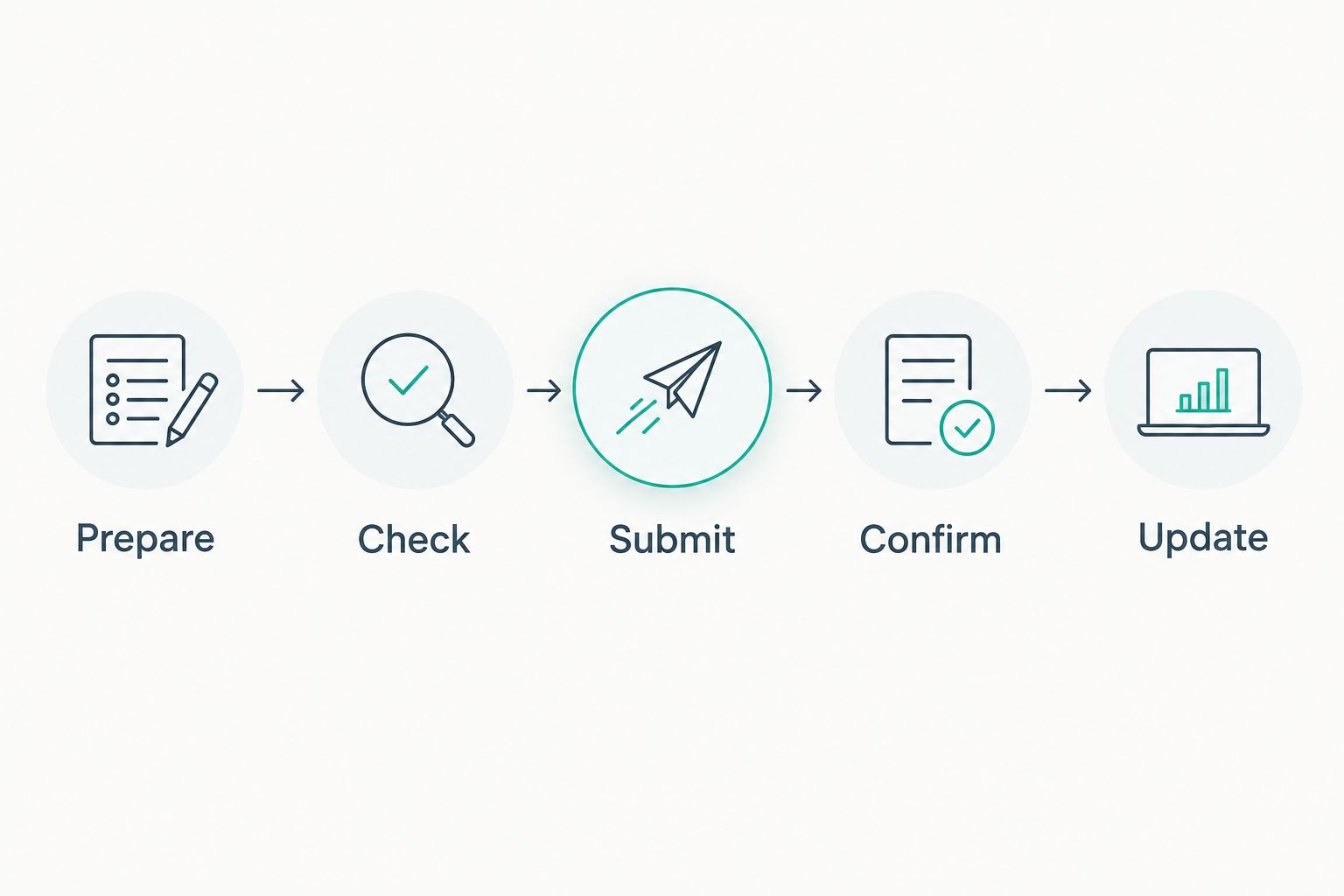
The working sequence is Prepare, Check, Submit, Confirm, Update. Keep those labels distinct in your 2026 tracking sheet so that a document request does not disappear merely because someone uploaded a file.
For the next stage, use the lender portal submission to short sale approval workflow. Keep an administrative status update separate from any lender approval terms.
When a lender requests updated documents
A replacement-document workflow should preserve the original submission rather than silently changing its contents. Use this variation when the lender requests refreshed financial records, a corrected form, or revised transaction documents.
- Record the request exactly, including any stated deadline and delivery instructions.
- Obtain the replacement from the responsible party. Check whether related documents also need correction, rather than assuming they do.
- Save the replacement as a new dated version. Mark the previous submission copy as superseded within your internal record.
- Submit the replacement through the accepted channel and identify the request it answers.
- Save the new receipt and confirm whether the outstanding item is resolved.
Expected result: The lender receives the intended replacement, and your team can reconstruct the sequence without guessing which attachment was current.
Do not automatically resend the entire original packet. Follow the lender’s instructions on whether it wants an individual replacement or a complete updated submission.
Troubleshooting
The upload fails
Check the lender’s permitted file format and upload limits. Re-export or split the file only as the receiving instructions allow, then reopen every resulting file to check readability and completeness.
The fax report says successful, but receipt is unconfirmed
Verify the destination and ask the receiving department to check the correct loan file. Preserve the transmission report, but keep the status as receipt unconfirmed until the available evidence supports a change.
The lender will not discuss the file
Ask whether the borrower authorization is missing, incomplete, expired under its requirements, or associated with a different party. Resolve the specific authorization issue rather than repeatedly resending the financial package.
The lender says documents are missing
Compare the lender’s missing-item list against the submission record. Determine whether the issue is an omitted file, an incomplete document, unreadable pages, or routing to the wrong category before sending replacements.
Your team submits conflicting versions
Pause further submissions and have the designated owner reconcile the file history. Identify the intended current version, then ask the lender how to correct the record; do not assume another upload cancels an earlier document.
Customize your workflow
Keep judgment with people; standardize document handling. Use task reminders for outstanding requests, but review lender messages before turning them into seller-facing statements about progress or approval.
Shortsalesdoneright short-sale processing is best for agents who want package preparation and lender negotiation outsourced. The service provides a dedicated point of contact and weekly lender updates; the trade-off is that sellers and agents still need to supply requested information and review transaction decisions. Lender approval remains outside the processor’s control.
For a 2026 brokerage handoff, define who collects seller records, who submits documents, and who communicates each update. Request processing help through the realtor intake form on the site when you are ready to delegate that work.
Request short-sale processing help
Ask about full package preparation, a dedicated contact, and weekly lender updates.
FAQ
What is fax to digital short sale submission?
Fax to digital short sale submission replaces an unmanaged paper-and-fax routine with controlled electronic records, verified delivery, and tracked lender follow-up. The lender’s accepted channel still determines whether final delivery uses a portal, secure transfer, or fax.
Can I stop faxing short-sale documents once I scan them?
Only if the lender accepts another submission channel for that file. Scanning creates digital source records; it does not change the lender’s delivery requirements.
Does a successful upload mean my short sale is approved?
No. A successful upload establishes neither package completeness nor short-sale approval. Confirm receipt and outstanding items separately, then review any lender decision on its actual terms.
What documents belong in a digital short-sale package?
Use the lender’s current checklist for the borrower and transaction stage. Requirements can include authorization, financial and hardship records, and transaction documents, but a generic checklist does not establish what your lender requires.
Should I email borrower financial documents to the lender?
Use only the delivery method the lender has verified and your brokerage permits. Do not send sensitive records to an unverified address or treat ordinary email as an approved channel by default.
Can Shortsalesdoneright handle the package and lender follow-up?
Shortsalesdoneright provides full short-sale package preparation, lender negotiation, a dedicated point of contact, and weekly lender updates. Agents and homeowners must still provide requested information, and the service does not guarantee approval.
Does submitting a short-sale package stop foreclosure or erase the remaining debt?
Do not treat package submission as a foreclosure stop or a release of unpaid debt. Lender terms and state law vary; direct questions about foreclosure deadlines, remaining debt, and legal rights to a qualified attorney, and tax questions to a qualified tax professional.
One last thing
Ask what remains outstanding, not just whether the package arrived. That question separates delivery tracking from actual file progress. Make the answer the basis of your next seller update.