

Instead of manually rebuilding a lender package from your transaction file, connect your SkySlope short sale processing workflow through a controlled document handoff to your processor. This 2026 guide explains how to assign responsibility, transfer the right documents, and keep lender updates tied to the transaction without assuming an automatic software connection.
- Use SkySlope short sale processing as a document-handoff workflow, not an assumed automatic sync.
- Shortsalesdoneright is best for real estate agents who want short-sale package preparation and lender negotiation outsourced.
- Confirm authorization, document requirements, and the secure delivery method before transferring seller records.
- Separate package delivery, lender submission, and lender approval in your transaction notes.
Why this matters
A brokerage transaction file and a lender review package serve different purposes. Your brokerage needs a record of the transaction. The lender needs the information required to evaluate the proposed short sale. Treating those files as interchangeable leaves responsibility unclear.
Shortsalesdoneright is best for real estate agents who want short-sale package preparation and lender negotiation outsourced. Shortsalesdoneright prepares the full short-sale package for agents and provides a dedicated point of contact and weekly lender updates.
Your role remains distinct: manage the listing, communicate with your client, and keep the brokerage record current. The processor handles the assigned processing work. Neither a complete file nor a successful handoff guarantees lender approval.
Before you start
- Confirm access and authority. Have authorized access to the relevant SkySlope transaction, your brokerage’s document-sharing rules, and the seller permissions required for the processor to communicate with the lender.
- Agree on the receiving process. Ask the processor for the current document checklist, approved delivery method, and named contact. Request help through the appropriate agent intake form on the service website before sending sensitive records.
- Check the non-obvious gotcha: access is not authorization. Giving someone transaction access does not replace lender-required authorization. Confirm both separately, and do not share your login credentials.
For a 2026 file, use the lender’s current requirements rather than copying an old transaction checklist. Ask which records need updating and how the lender wants them delivered. Do not assume that a previously accepted package is sufficient for a different seller or loan.
Configure the transaction handoff
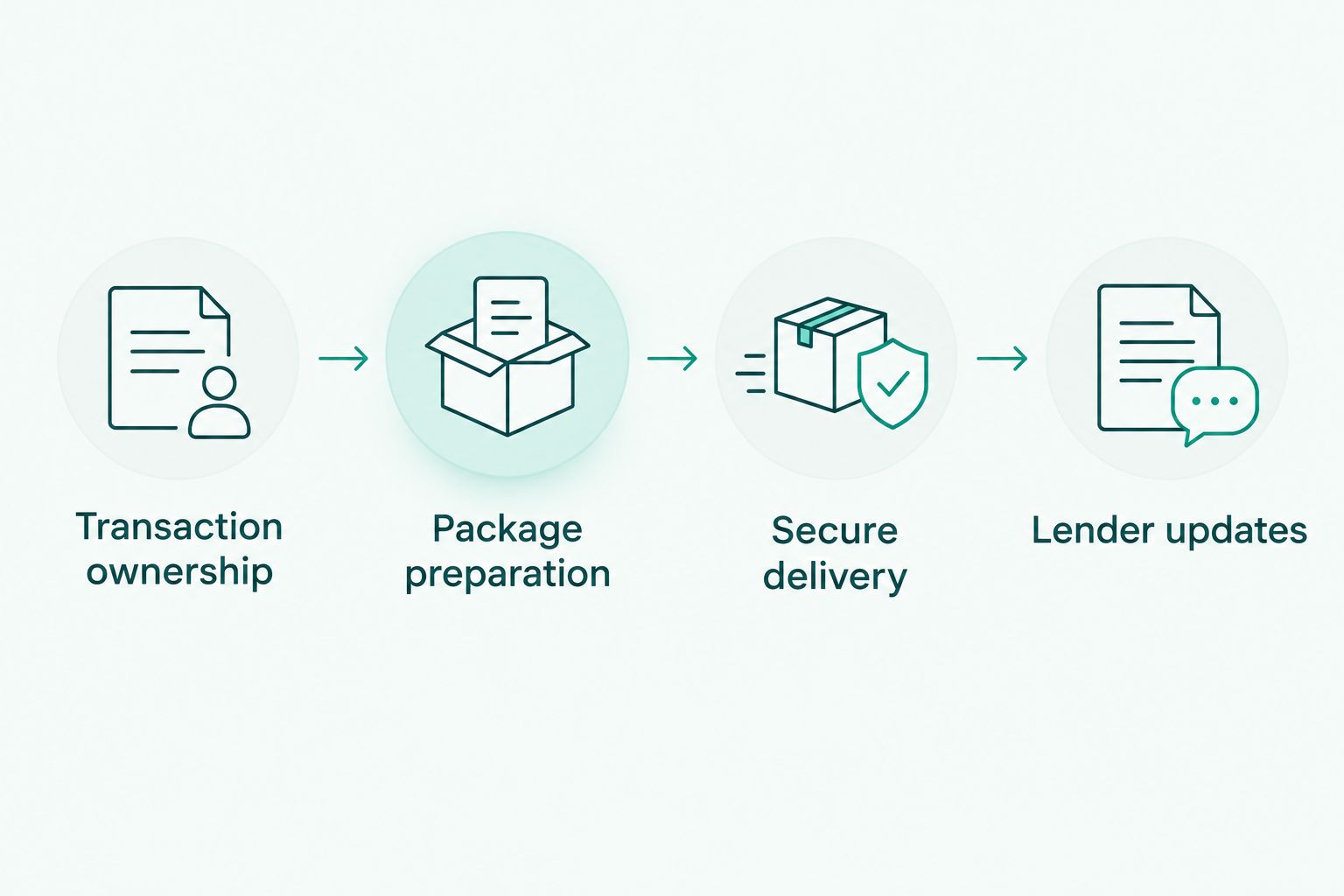
Transaction ownership
- Identify the file. Confirm the property address, seller names, and relevant loan references through your approved process. Check that the records belong to the correct transaction before sharing anything.
- Name the responsible people. Record who manages the listing, who prepares the lender package, who communicates with the seller about missing documents, and who records updates for the brokerage.
- Define the boundary. Agree which materials belong in the brokerage record and which sensitive records should pass directly through the processor’s approved collection method.
- Write the handoff rule. Specify what makes the file ready for processor review. Include outstanding items rather than presenting an incomplete collection as a finished package.
Use your brokerage-approved SkySlope setup for these records. Follow the labels and permissions in your account rather than creating a parallel system that other transaction participants cannot interpret.
Expected result: Every participant knows which transaction is involved, who owns the next action, and where documents should go. No one needs another person’s password to continue.
Package preparation
- Start with the processor’s checklist. Compare each requested item with the documents already collected. A signed purchase agreement does not establish that the lender package is complete.
- Separate document categories. Identify transaction documents, seller financial records, hardship materials, and lender authorization documents as applicable. Confirm the actual requirements with the processor instead of treating these categories as a universal checklist.
- Check usability. Review names, signatures, dates, missing pages, and readability. Flag inconsistencies for correction by the appropriate person; do not alter signed documents to make them match.
- Identify the current version. Distinguish a revised offer or corrected document from the version it replaces. Preserve earlier records according to brokerage policy, but make the intended submission version clear.
- Record unresolved items. Give each missing item an owner and a next action. Tell the processor what remains outstanding when requesting a preliminary review.
For document planning, use the guide to documents to include in a short-sale package. The lender’s requirements and the processor’s instructions still control the actual submission.
Expected result: The processor receives an organized collection with current versions identified and missing items disclosed—not an unexplained document dump.
Secure delivery
- Confirm the recipient. Verify the processor contact and approved transfer destination using an established communication channel. Do not redirect seller records solely because an unexpected message requests it.
- Transfer only the intended records. Use the agreed delivery method and authorized sharing permissions. Avoid broad access when a narrower handoff meets the need.
- Include a handoff summary. State the property, the package purpose, the documents transferred, known gaps, and any known deadlines. Keep sensitive financial details out of general status notes.
- Request receipt confirmation. Ask the processor to confirm receipt and identify unusable or missing documents. Keep delivery confirmation separate from confirmation that the package is ready for lender review.
Do not build a 2026 workflow around an assumed SkySlope-to-processor synchronization. Use a deliberate handoff unless your brokerage and processor have confirmed the connection, permissions, and behavior of an actual integration.
Expected result: You can establish what was sent, who received it, and what still needs attention. A successful transfer is not recorded as lender submission or approval.
Lender updates
- Agree on status terms. Distinguish package preparation, missing information, lender submission, lender review, and a written lender decision. Avoid a single broad status that hides the next action.
- Assign update ownership. Choose who receives the processor’s updates and who records the relevant information in the transaction file. Prevent conflicting summaries from becoming competing records.
- Separate facts from tasks. Record what the lender requested, who must respond, and the stated deadline. A request for more documents is not a decision on the sale.
- Review written terms before proceeding. Route legal and tax questions to qualified professionals. Confirm transaction instructions with the appropriate parties rather than interpreting lender language on your own.
Shortsalesdoneright provides a dedicated point of contact and weekly lender updates. Use those updates to maintain a clear transaction record, while addressing time-sensitive requests according to their actual deadlines.
Expected result: The agent can explain the current stage, the open request, and the responsible person without confusing activity with approval.
The handoff has four distinct parts. Keep them separate even when the same person performs more than one task.
Send an update whenever a document changes
A first package handoff and a later revision need different treatment. Sending the entire file again without explaining the change makes the recipient reconcile versions instead of addressing the request.
| Workflow | Best for | Advantage | Limitation |
|---|---|---|---|
| Initial package handoff | Starting processor review | Establishes the document collection and known gaps | Requires an initial completeness check |
| Document-change handoff | Revised offers or requested supporting records | Identifies exactly what changed | Depends on clear version ownership and receipt confirmation |
For the document-change workflow:
- Confirm the change. Identify whether the new record corrects an error, replaces an earlier version, or answers a specific lender request.
- Identify the replacement. Tell the processor which earlier document the new record supersedes. Preserve the transaction history under brokerage policy.
- Explain the impact. Flag changes to offer terms, seller information, or other relevant facts for processor review. Do not decide independently that a change is immaterial to the lender.
- Confirm the next action. Ask whether the processor needs anything else and whether the lender must receive the revision. Record the answer rather than assuming onward delivery.
Best for agents with an active lender review: Use a change-specific handoff instead of repeatedly resending an unmarked package. Its limitation is straightforward: the process fails when nobody owns version control.
Troubleshooting
The processor cannot open the shared records
Check the recipient identity, access permissions, and approved transfer method. Ask the recipient to confirm access after the correction. Do not solve an access problem by sharing your SkySlope credentials or making sensitive records broadly accessible.
The lender requests documents already collected
Compare the request with the actual submitted version. Check whether the record was omitted, unreadable, incomplete, or needs updating under the lender’s requirements. Ask the processor to reconcile the request before asking the seller to recreate everything.
The wrong offer version reaches the processor
Identify the intended version and explain which record it replaces. Have the processor confirm what was received and whether corrective delivery to the lender is necessary. Keep the correction visible in the transaction history rather than silently replacing the record.
The transaction notes suggest approval too early
Replace vague language with the documented stage. Receipt, package review, and lender submission do not establish approval. Review the written lender decision and its conditions with the appropriate parties before treating the transaction as ready for the next milestone.
A deadline arrives before the next weekly update
Contact the assigned processor promptly and communicate the exact deadline and source. Do not wait for the regular update cycle. If a foreclosure notice or legal deadline is involved, direct the homeowner to a qualified attorney; a document handoff does not establish that a deadline has changed.
Customize your workflow
Make the process repeatable without collecting unnecessary information. Your reusable 2026 handoff template should contain 3 checks: identity, completeness, and receipt. Those checks establish whose file it is, what remains missing, and whether the intended recipient received it.
Keep the agent and homeowner experiences separate. Agents need package ownership, clear requests, and lender status. Homeowners need plain explanations of what they must provide and help comparing a short sale with other options.
Outsourcing also has a boundary. Shortsalesdoneright handles package preparation and lender negotiation, but the agent still needs to manage brokerage responsibilities and client communication. Processing support does not replace legal or tax advice, and it does not guarantee a lender decision. Lender terms and state law vary.
For a new 2026 listing, agree on responsibilities before sending the first package. If you are ready to outsource processing, request help through the appropriate agent intake form on the website and confirm the secure document-delivery process.
Request short-sale processing help
Start with the agent intake form, then confirm package requirements and the secure handoff method.
FAQ
How do I connect SkySlope to short sale processing?
Connect the workflow through an agreed document handoff: assign responsibility, prepare the requested records, transfer them securely, and record lender updates. Use automatic transfer only when your brokerage and processor have confirmed an actual integration and its permissions.
Does this guide require a native SkySlope integration?
No. This guide describes a controlled document-handoff process rather than a native software integration. Confirm any proposed automated connection with your brokerage and processor before relying on it.
Who is Shortsalesdoneright best for?
Shortsalesdoneright is best for real estate agents who want short-sale package preparation and lender negotiation outsourced. The service provides a dedicated point of contact and weekly lender updates.
Should I upload every seller financial document to the transaction file?
Follow your brokerage’s records policy and the processor’s approved collection instructions. Transfer only the information needed through authorized channels, and keep sensitive details out of general status notes.
What should I do when a short-sale offer changes?
Send a change-specific handoff that identifies the revised offer and the version it replaces. Ask the processor to confirm receipt and determine the required lender submission steps.
Does sending a complete package guarantee lender approval?
No. A complete package does not guarantee lender approval, forgiveness of an unpaid balance, or a specific credit-score result. Lender terms and state law vary; ask qualified professionals about legal and tax consequences.
How should I organize a short-sale workflow in 2026?
Use the lender’s current requirements, identify the owner of each open task, and distinguish delivery from submission and approval. Keep document revisions and time-sensitive requests visible in the transaction record.
One last thing
A delivery confirmation proves delivery—not completeness, lender submission, or approval. Make those separate checkpoints in your transaction notes. That small distinction keeps your next client update tied to what actually happened.