

Instead of manually reconciling showing requests with bank emails, use a ShowingTime short sale listing status workflow that tracks property access separately from lender review. Keep showing instructions current, verify each lender milestone, and change the MLS status only when the transaction facts and local rules support it.
- ShowingTime short sale listing status workflows need separate records for showing access, MLS status, and lender review.
- Shortsalesdoneright is best for agents seeking outsourced short-sale package preparation and lender negotiation.
- Use verified lender communications to update the negotiation record, not showing activity or buyer feedback.
- Require agent review before publishing changes to MLS status or buyer-facing showing instructions.
Why this matters
A showing appointment is not a lender milestone. A property can receive showing requests while a short-sale offer is under review. Neither activity, by itself, establishes what the MLS status should be.
For your 2026 workflow, keep three questions separate: Can someone visit the property? What does the MLS require you to report? What has the lender actually communicated? Mixing those questions creates instructions that buyers, sellers, and transaction partners can misread.
Shortsalesdoneright provides short-sale processing and lender negotiation services. Agents can outsource preparation of the full short-sale package and work with a dedicated point of contact receiving weekly lender updates. That support does not replace the agent's responsibility to verify listing instructions and follow local MLS requirements.
Before you start
- Confirm access and ownership. You need access to the listing's ShowingTime configuration, permission to maintain the MLS record, and an approved place to store transaction notes. Identify who can change each record.
- Gather the source documents. Have the listing identifier, seller's access instructions, contract information, and current written lender communications. Use your brokerage's approved secure process for financial documents.
- Check the hidden dependency: local rules. Showing permissions, contract status, and short-sale disclosures are different matters. Check your MLS requirements and brokerage procedures before deciding which event warrants a status change.
This is a controlled handoff workflow, not a claim that a native ShowingTime-to-lender integration exists. ShowingTime screens and available controls depend on your setup. The bold record labels below are suggested fields for your internal tracker, not purported ShowingTime buttons.
Configuration unit: Listing identity and responsibility
Establish the listing record
- Create Listing ID in your approved transaction tracker. Enter the MLS identifier and property address so everyone can match showing activity to the correct file.
- Add Listing owner and Processing contact. Name the agent responsible for public listing information and the person responsible for confirming lender milestones.
- Create separate fields for MLS status, Showing access, and Lender milestone. Copy current information from each source and record when you verified it.
Expected result: One listing record connects the file without treating its separate statuses as interchangeable.
Use 1 record per listing as a setup rule. If your brokerage maintains multiple listing records for a property, document the relationship rather than relying on the address alone. A matching address is not enough to establish that two records serve the same listing purpose.
Keep the lender milestone factual. Write “package submitted; receipt not confirmed” when that is all the evidence supports. Do not shorten it to “under review” merely because the package was sent.
For records created in 2026, include the year in verification dates. A copied note such as “updated March 6” is harder to interpret when a transaction file stays open across calendar years.
Configuration unit: Showing access and instructions
Set the access rules
- Open the correct listing in ShowingTime and review its current appointment configuration. Compare the instructions with the seller's current authorization and your brokerage's access procedures.
- Adjust the available appointment controls to reflect the permitted showing arrangements. Keep access instructions separate from statements about contract acceptance or lender review.
- Verify the resulting instructions through the views your account provides. Check that authorized recipients receive the intended access information and that private financial details are absent.
Expected result: Showing instructions describe how an appointment is handled without implying that the lender has approved the transaction.
Use plain instructions that match the verified situation. If continued showings are permitted, communicate the actual appointment requirements. If access has changed, confirm the change with the responsible party before editing the instructions.
Do not put hardship letters, mortgage account details, or lender correspondence into showing instructions. Those materials belong in the secure transaction process, not in information distributed to people requesting appointments.
The next handoff is document preparation. The MLS listing to short-sale package workflow covers that separate process. Showing activity can inform your marketing record; it does not substitute for the documents a lender requests.
Configuration unit: Verified lender milestones
Build the review handoff
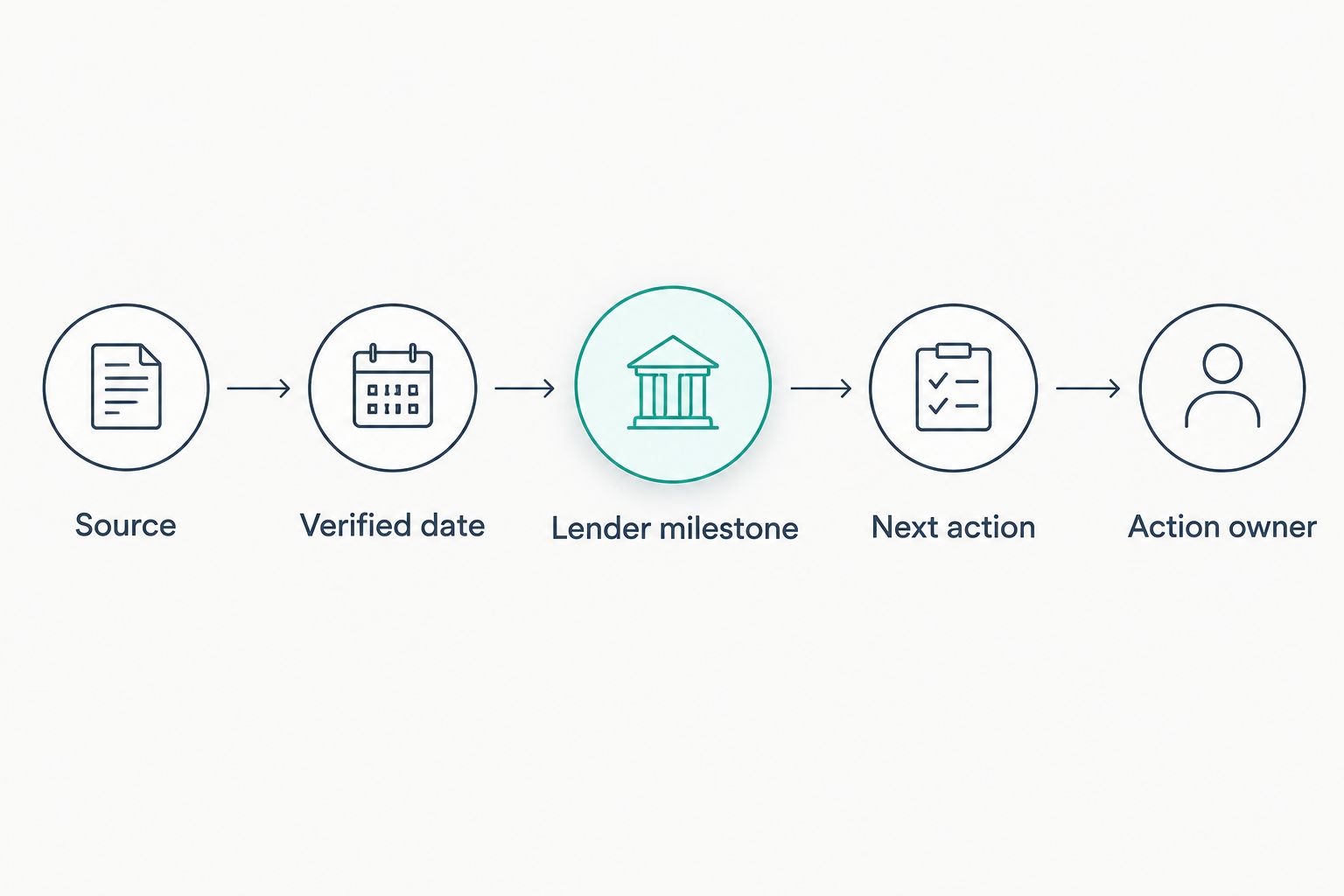
- Add Source, Verified date, Next action, and Action owner to the lender milestone record. Identify the communication supporting each update.
- When a lender communication arrives, have the processing contact record exactly what it establishes. Separate a document request, receipt acknowledgment, counteroffer, and written approval rather than treating them as equivalent progress.
- Route the verified update to the listing agent. The agent then determines whether the information requires an MLS change, revised showing instructions, a seller conversation, or no public change.
Expected result: Each lender update produces a documented next action without automatically changing the listing's public status.
Keep 2 separate decisions: record the lender event, then decide what listing action it requires. This review gate prevents a submission acknowledgment from becoming an unsupported approval statement.
Shortsalesdoneright provides a dedicated point of contact and weekly lender updates as part of its short-sale processing support. Use that communication to maintain the transaction record, while keeping urgent deadlines on a separate escalation path.
Schedule 1 weekly review as your team's housekeeping checkpoint. This is a suggested internal cadence, not a lender response deadline. Review outstanding requests, unresolved access questions, and the next person responsible for action.
Configuration unit: Publication and verification
Approve the listing change
- Check the proposed action against the contract, written lender communication, seller instructions, and applicable MLS rules. Ask your broker to resolve uncertainty before publishing.
- Update the MLS record and ShowingTime instructions separately where required by your setup. Do not assume that changing one record correctly updates every related record.
- Reopen the records after saving. Compare what is displayed with the intended change, then document the verification and notify the relevant transaction participants.
Expected result: The published listing and showing instructions match the verified facts, and your file identifies who checked them.
For example, a March 6, 2026 lender request for updated documents supports a new document task. It does not establish lender approval. Record the request, assign responsibility, and retain the existing public status unless another verified fact requires a change.
If written approval arrives on March 13, 2026, review its conditions and deadlines before telling anyone the transaction is ready to close. Approval terms still need to be satisfied. Coordinate the next steps with the appropriate transaction professionals.
Variant: Update the workflow when the lender responds
You can reverse the starting point. Instead of beginning with a showing or listing review, begin with a new lender communication and route it through the same verification gate.
Use an internal task or notification process your brokerage already supports. Do not build a public status change around an email subject line alone; the message content and attached terms determine the action.
| Workflow option | Best for | Main advantage | Main limitation |
|---|---|---|---|
| Manual review checklist | Agents handling individual files directly | Keeps each decision visible to the responsible agent | Requires deliberate follow-up and record maintenance |
| Notification-assisted review | Teams with an established internal task system | Brings new communications to the assigned reviewer's attention | A notification does not confirm the message's meaning or accuracy |
Start with the manual review checklist if ownership is unclear. Adding notifications to an unassigned process only creates more alerts.
For a notification-assisted setup, route the event to a reviewer, not directly to a public status field. Require the reviewer to confirm the property, read the communication, identify the milestone, and assign the next action. Preserve human approval for MLS and showing-instruction changes.
Neither option guarantees that a lender will approve a short sale. The workflow controls your team's handling of information, not the lender's decision.
Troubleshooting
Showing instructions do not match the MLS record
Check each record separately and compare both with the current authorized instructions. Confirm how your particular setup receives listing information before deciding where to correct the mismatch. After the correction, reopen both records and verify the result.
The team marked the file approved after submission
Return to the actual lender communication. Replace the unsupported milestone with the event you can substantiate, such as submission or receipt acknowledgment. Correct any message sent to the seller or buyer's agent that overstated the lender's position.
A lender update reached the wrong transaction file
Match the communication against the property address, listing identifier, and authorized borrower information using your secure process. Correct the assignment before taking action. Escalate any accidental disclosure under your brokerage's privacy procedures.
Seller access instructions changed during review
Confirm the revised instructions and check applicable contractual obligations with your broker. Update the appointment configuration without inventing a lender milestone. A change in access does not, by itself, mean the lender has accepted or rejected the offer.
A deadline is approaching before the weekly review
Send the communication immediately to the assigned agent and processing contact. Record the deadline and responsible person. A weekly update schedule is not a reason to delay a time-sensitive lender request, contract issue, or foreclosure-related notice.
Customize your workflow
Expand the workflow around responsibilities, not extra status labels. Add a task when someone must supply a document, confirm a deadline, review written terms, or communicate an authorized update.
Shortsalesdoneright short-sale processing is best for agents who want package preparation and lender negotiation handled outside their own transaction workload. The service supports those tasks; it does not guarantee approval or remove the need for brokerage oversight.
Keep seller-facing updates brief: what changed, what remains unresolved, and what the seller needs to do. Avoid translating a lender request into a prediction about approval, debt forgiveness, or credit results.
If you are ready to outsource processing, request help through the agent intake form on the site. Bring the current listing information and the questions blocking your next action.
Request short-sale processing help
Get help with package preparation and lender negotiation while you manage the listing.
FAQ
Does ShowingTime short sale listing status mean the lender approved the sale?
No. Showing activity and appointment instructions do not establish lender approval. Verify the lender's written communication and any conditions before describing the transaction as approved.
Can I automatically change the MLS status when a lender email arrives?
Use an agent review gate before changing the MLS status. An email can request documents, acknowledge receipt, or communicate terms, and those events do not mean the same thing.
Should I stop showings when a short-sale offer goes to the lender?
Do not use submission alone as the decision rule. Follow the contract, authorized seller instructions, brokerage guidance, and local MLS requirements when deciding how to handle further showings.
What should I put in short-sale showing instructions?
Include the authorized information needed to arrange and conduct the showing. Keep borrower financial details and private lender correspondence in your secure transaction process.
Who should update ShowingTime during a short sale?
Assign the listing agent or an authorized team member to maintain showing instructions. Separately identify who verifies lender milestones so responsibility does not disappear between the listing and processing teams.
Can Shortsalesdoneright handle the lender negotiation for my listing?
Shortsalesdoneright provides short-sale processing and lender negotiation services, including full package preparation for agents, a dedicated point of contact, and weekly lender updates. The lender retains control of its decision and terms.
What should my brokerage check in its 2026 workflow?
Check record ownership, current local MLS requirements, showing permissions, and the source supporting each lender milestone. Test the handoff before using notifications to prompt public listing changes.
One last thing
The safest status update is sometimes no public change at all. A verified lender event can require an internal task without changing the MLS record or showing instructions.
Keep the audit trail even when the public listing stays the same. Lender terms and state law vary; direct legal and tax questions to qualified professionals. Do not promise approval, forgiveness of an unpaid balance, or a specific credit-score outcome.